In fall 2017, Bestmile was looking for a frontend developer and found Jean-Baptiste Cochery. Then I applied. In a bet that paid off nicely, Bestmile hired both of us, a month apart, in early 2018.
There was no dedicated frontend team at the time. The three existing web apps had been built by people who had since left, moved into team lead or mobile roles, or were never really frontend developers in the first place. That led to the decision to scrap the main app, FMT (Fleet Management Tool).
I am usually wary of starting from scratch without business knowledge, since newcomers tend to repeat the same mistakes, so at first I tried to carry some of FMT’s concepts over to our new Operator Dashboard. Jean-Baptiste was less conservative and keener to try new things. Our differences turned out to be very complementary, and we shared the same core values and work ethic. The only thing missing was a designer. About a year in, our two-person team was joined by Shannon Alexandrine, a dedicated and remarkably prolific designer. We were led by David Geretti, our diligent product manager and team lead. Here is what the four of us designed and built over three and a half years.
Overview
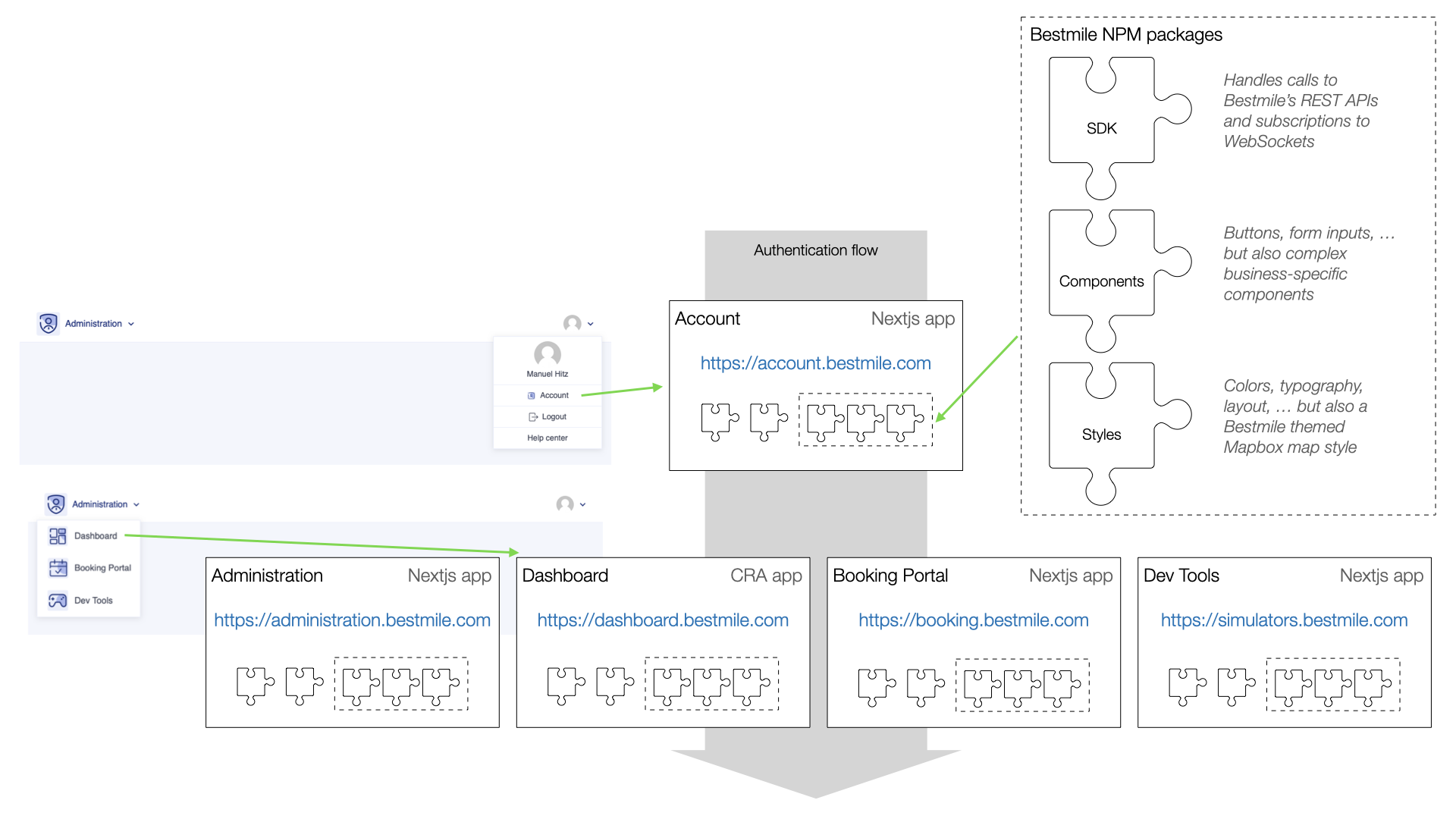
At the time of writing, Bestmile’s web frontend consisted of these applications:
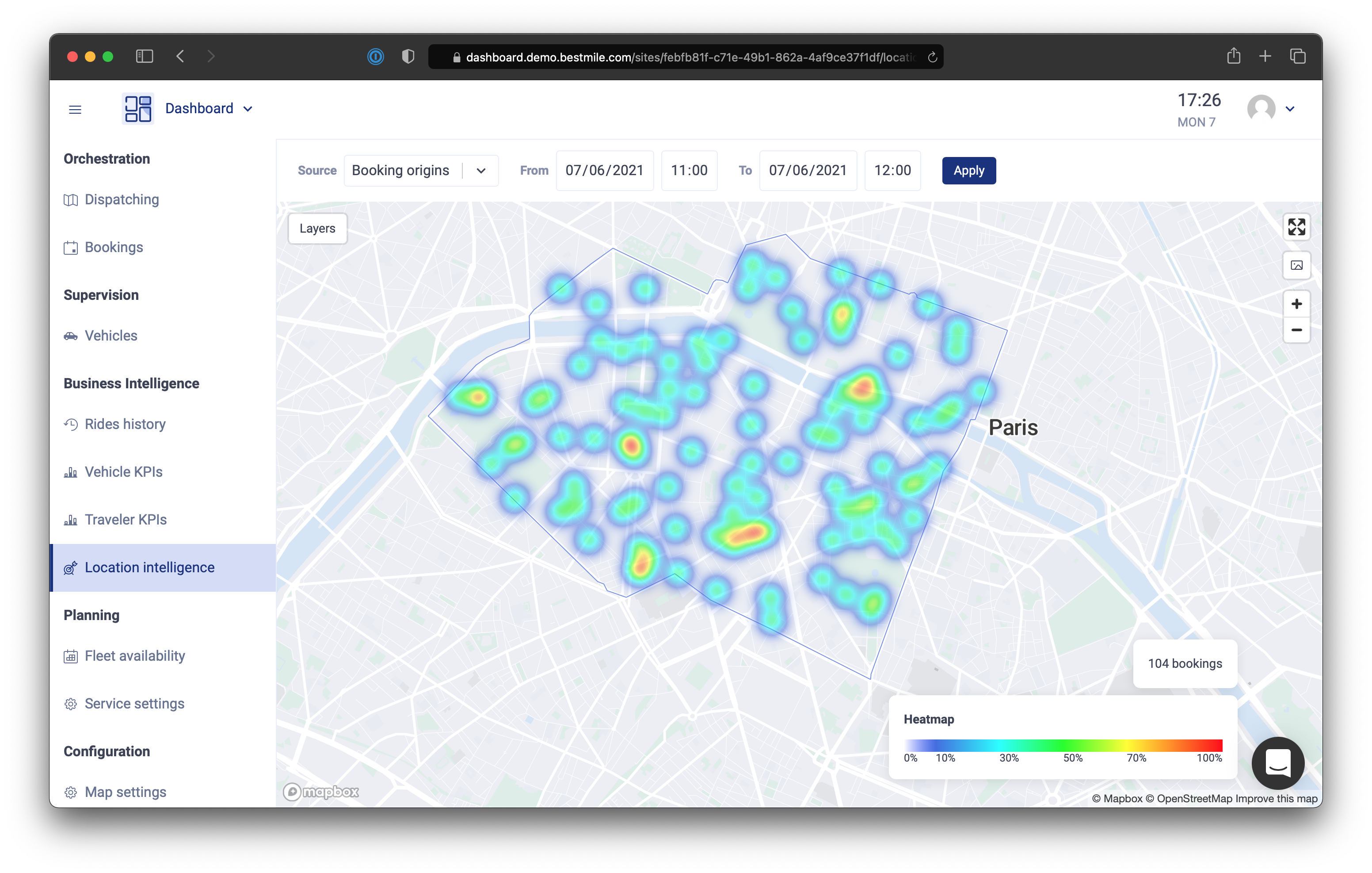
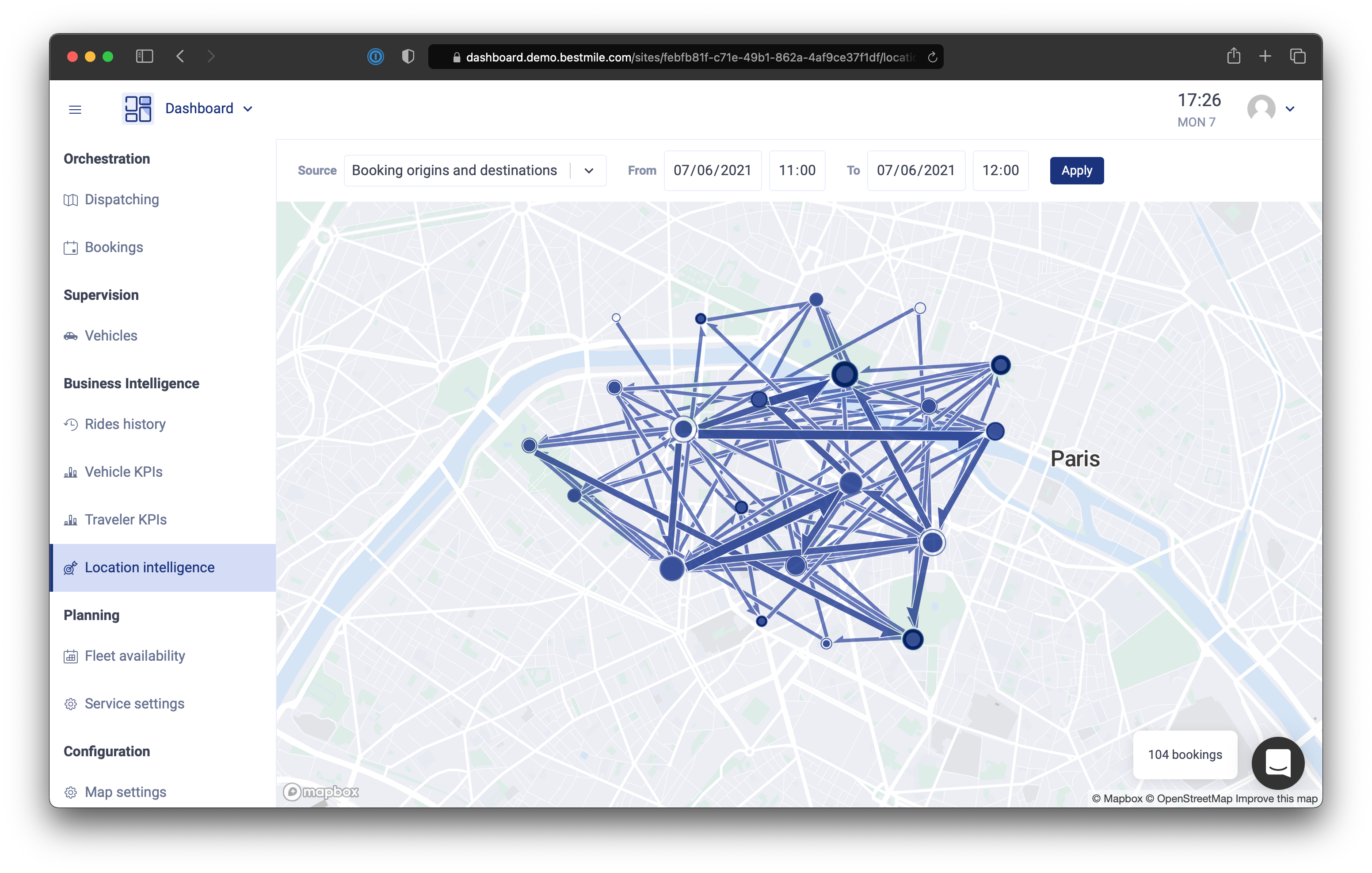
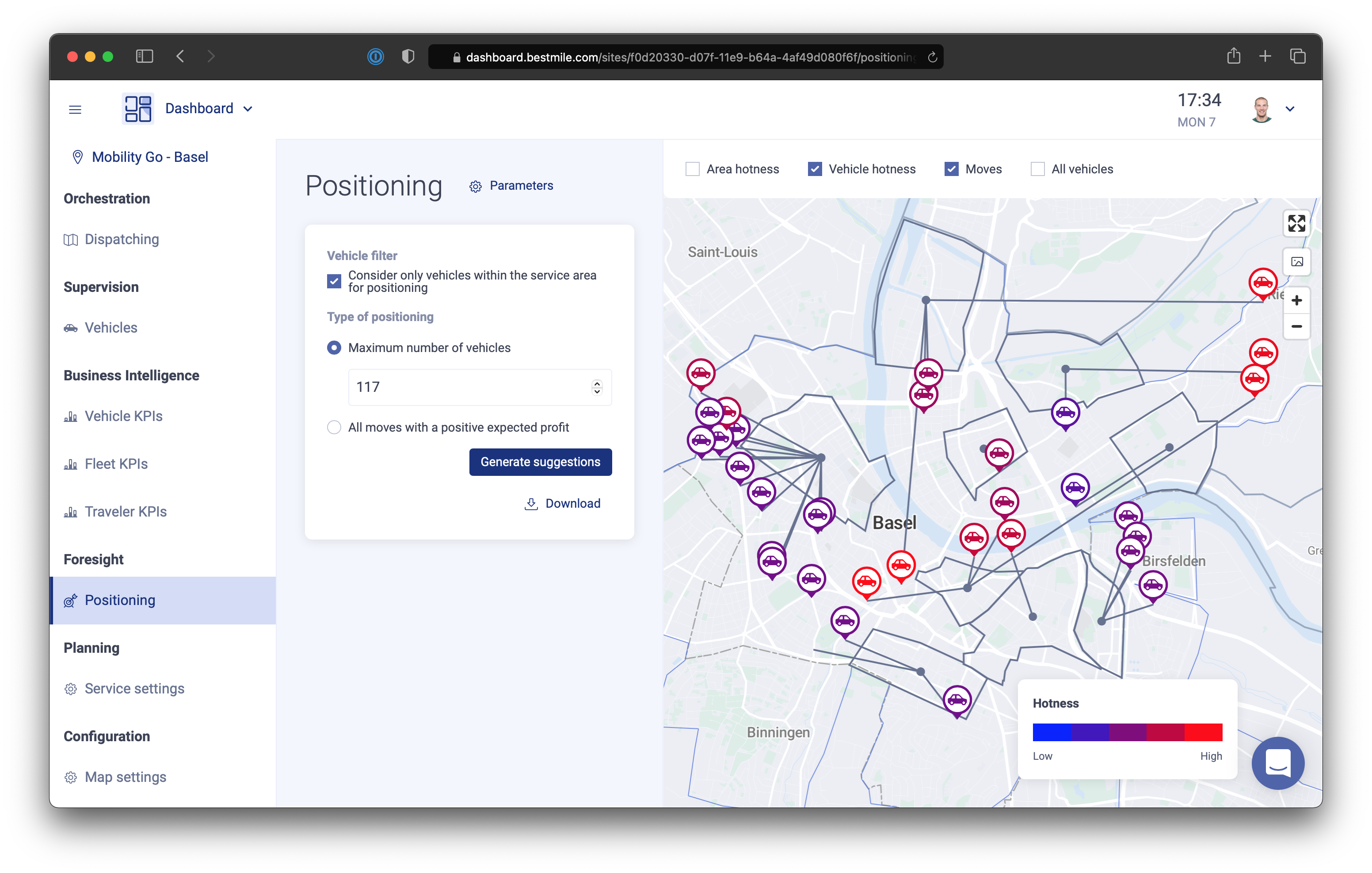
- Dashboard, for supervising operations in real time: following vehicles on a map along with their planned routes to upcoming pickups and drop-offs, managing rides and bookings, visualizing pickup and drop-off locations over time, pre-positioning vehicles based on historical data, and planning fleet availability
- Administration, for everything not related to live operations: users with fine-grained permissions, vehicles, operating areas, routing settings, and so on
- Booking Portal, for third parties to create bookings
- Dev Tools, for managing simulated fleets and demand during development and demos
- Account, providing single sign-on to all the other apps
There were also a few small experiments and legacy apps, such as stop signage showing upcoming departures at a bus stop, and a web portal showing a network of stops and lines.
The overall architecture of the frontend looked like this. None of it was planned far in advance; it grew naturally out of Jean-Baptiste’s and my experience.
Building blocks
We used React from the start and followed its move towards hooks and function components. We chose Mapbox over OpenLayers, which Bestmile had used before, because it is more developer-friendly. Jean-Baptiste drove most of our experiments with libraries and frameworks. Over three and a half years, we settled on:
- Flow, which in hindsight we somewhat regret given later announcements; TypeScript would most likely have been the safer bet
- Next.js as the framework for four of our five apps: its conventions suited us well, and it was simpler overall than Create React App
- Tailwind CSS, Jean-Baptiste’s favorite, an improvement over Emotion, which we used briefly, even if I am still not fully convinced CSS needed fixing
- Jest and React Testing Library for unit tests; the latter has a small API that pushes you to write user-centric tests, while the older parts of the code still had some Enzyme and React Test Renderer tests
- Semantic UI, until Shannon created a visual identity for our apps; it seemed the simplest and most complete of the UI frameworks we considered, alongside Rebass, Bloomer and Ant Design (today, I would look at something like React Spectrum)
- Docz to document every component, from buttons to the booking creation funnel; it was one of the first tools to support the very handy MDX format, though today I would choose Storybook
Once the groundwork was laid in 2018–2019 and the Dashboard had its core features, we started extracting and modularizing our code into private npm packages: CSS styles, map styles, React components, and a JavaScript SDK for Bestmile’s hundreds of API endpoints.
Style guide
Nothing groundbreaking here: by now, most teams have a style guide in some form. We never had the chance to put our variables, colors and fonts to the test with a dark theme or a custom client theme, which is usually when you discover that some of your assumptions were wrong.
Base components
Over time, we replaced Semantic UI components with our own: button, checkbox, radio and all other form inputs, popups, modals and popovers, tables, tabs, and so on.
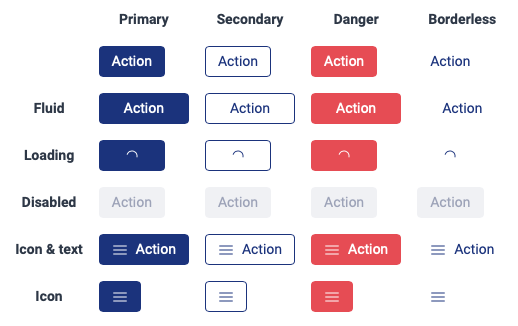
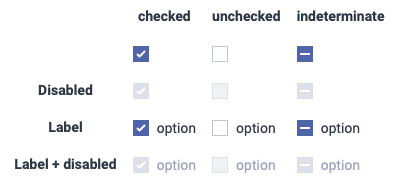
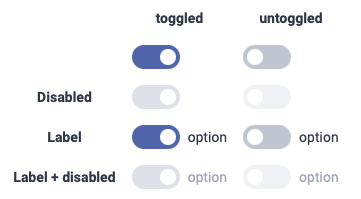
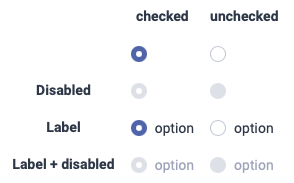
Some components wrap other libraries; dropdowns, for example, are built on React Select.
These components are fairly simple, and I have built them many times over. It is frustrating that plain HTML and CSS still make it hard to style checkboxes and radio buttons (hopefully that will change), that there are no native popups, and that date and time pickers vary so much between browsers (Safari on Mac only recently gained them).
Shared components
These are components any app can use, such as displaying a localized date or time. They are the kind of thing Bestmile could open-source.
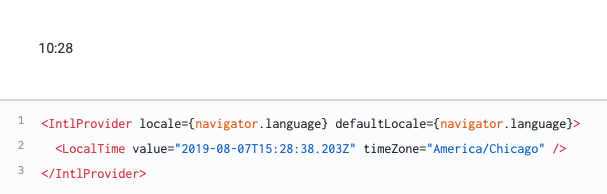
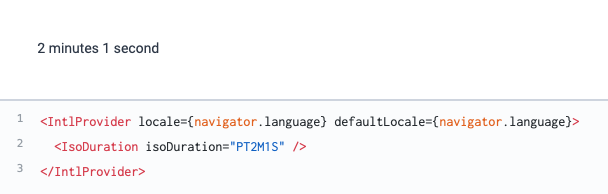
The components are packaged in a library that can be used in any React component:
import React from 'react'
import { Button } from '@bestmile/react-components'
…
export default function LoginForm() {
  …
  return (
    …
    <form>
      …
      <Button primary>Log in</Button>
      …
    </form>
    …
  )
}
Business components
Finally, some components are specific to Bestmile’s business. Some are shared between apps, others live in a single app.
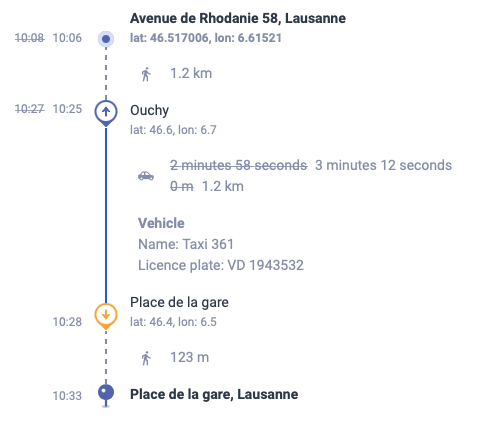
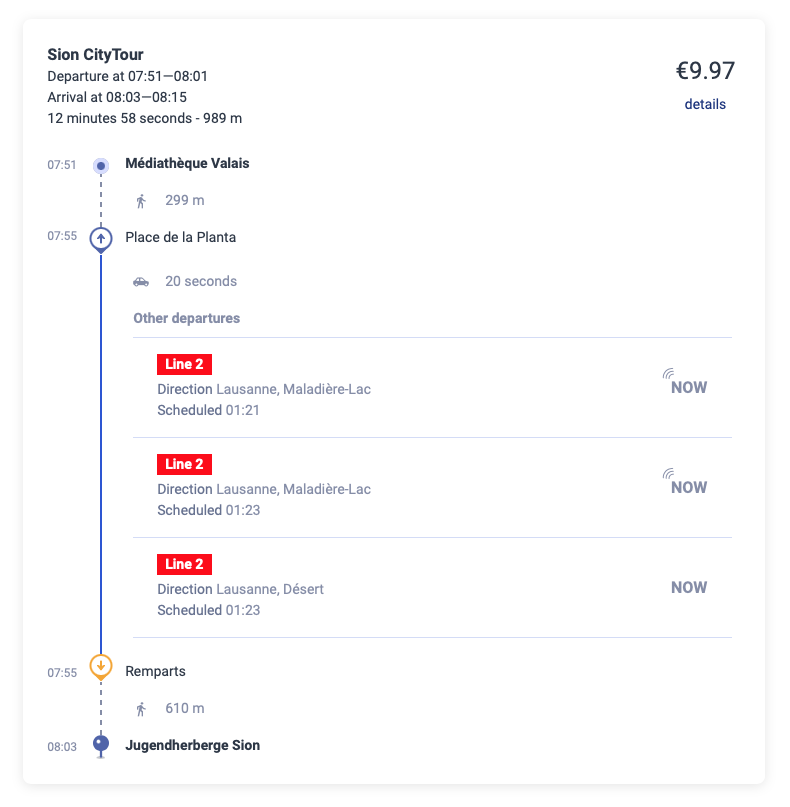
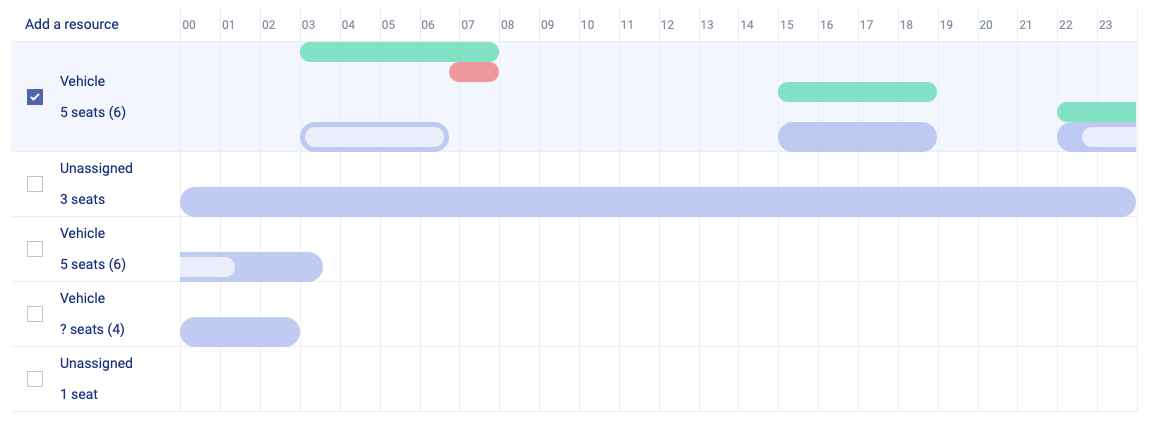
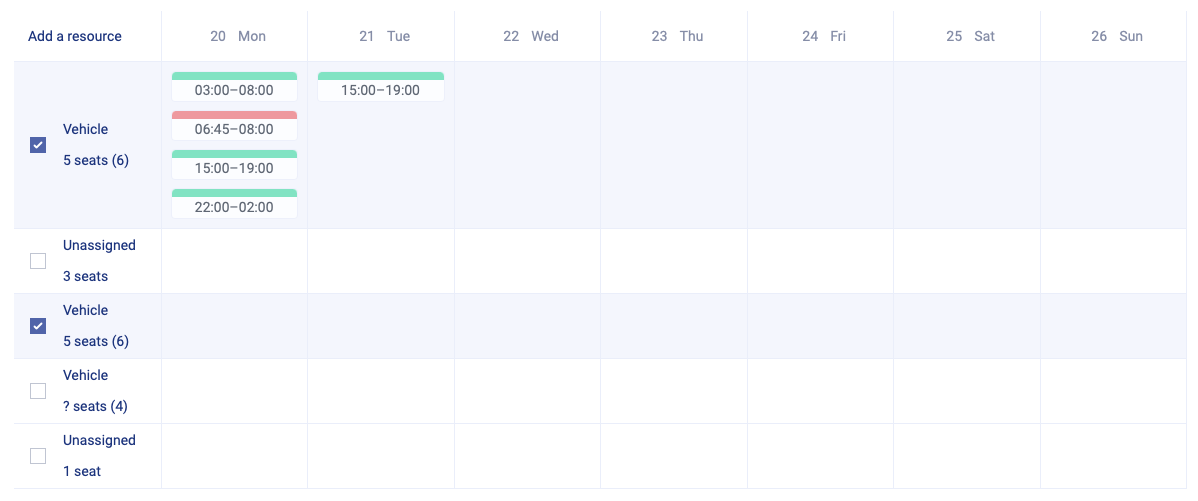
And there are many, many more.
SDK
At some point, we realized it would be much nicer to simply call an async function whenever we needed the backend. URLs would be hidden away, errors would have a consistent structure, unit tests would be simpler, and so on.
import sdk from '@bestmile/sdk'
…
const { login, api } = sdk('https://api.staging.dev.bestmile.io')
const { token } = await login(username, password, applicationID)
const vehicles = await api(token).fetchVehicles()
Errors
Handling API errors properly is something I have always struggled with. Together with the backend team, we took inspiration from RFC 7807 and agreed on a JSON error structure that allows error messages to be shown in the user’s language:
{
   “type”: “https://developer.bestmile.com/docs/api/errors/unique_error_code”,
   “title”: “unique error code”,
   “detail”: “A short message explaining the issue in English”,
   “status”: 400
}
The content type of the error is application/problem+json, and its attributes are:
- type, ending with a unique error code such as validation_error, bad_request, forbidden or not_found
- title, the error code in plain English, identical for every occurrence of that error, as the RFC requires
- detail, an English message mostly meant for developers, which can also serve as a fallback for end users
- status, the HTTP status code
The structure can be extended with extension members. Error translations rely on the unique error code and the extension members.
Async hooks
Jean-Baptiste came up with two handy hooks that we ended up using in many places.
This snippet fetches all vehicles when the component mounts:
import { useAsync } from '@bestmile/async-hooks'
…
// in the React component:
const { loading, data } = useAsync(api.fetchVehicles, [])
This one polls for data, starting when the component mounts and stopping when it unmounts:
import { useAsync } from '@bestmile/async-hooks'
…
// in the React component:
const { data, startPolling, stopPolling } = useAsync(() => api.fetchRides(…), [])
useEffect(() => {
  startPolling(5000)
  return () => {
    stopPolling()
  }
}, [])
And this one triggers an API call on demand, for example when a button is pressed, which is perfect for forms:
import React from 'react'
import { useAsyncCallback } from '@bestmile/async-hooks'
…
export default function AddOperator() {
  …
  const [createOperator, createOperatorResult] = useAsyncCallback(api.createOperator)
  …
  return (
    …
    <OperatorForm
        …
        saving={createOperatorResult.loading}
        onSubmit={createOperator}
    />
    {createOperatorResult.error && (
        <ApiErrorMessage error={createOperatorResult.error}/>
    )}
    …
  )
}
Unit tests
Everything is easy to mock in unit tests, with no need to mock fetch or anything network-related. Here are the unit tests for the component in the previous snippet:
import React from 'react'
import { createOperator } from '@bestmile/sdk'
…
describe('AddOperator', () => {
  …
  describe('when mounted', () => {
    beforeEach(async () => {
      await act(async () => {
        wrapper = render(<AddOperator />)
      })
    })

    it('renders a form', () => {
      expect(wrapper.container).toMatchSnapshot()
    })

    describe('then the form is submitted and the api returns a success', () => {
      beforeEach(async () => {
        await act(async () => {
          createOperator.mockResolvedValueOnce({})
          fireEvent.click(wrapper.getByText('Save'))
        })
      })

      it('creates the operator', () => {
        expect(createOperator).toHaveBeenCalledWith(…)
      })
    })

    describe('then the form is submitted and the api returns an error', () => {
      beforeEach(async () => {
        await act(async () => {
          createOperator.mockRejectedValueOnce({
            error: { type: 'default', detail: 'Oops' }
          })
          fireEvent.click(wrapper.getByText('Save'))
        })
      })

      it('displays the error', () => {
        expect(wrapper.container).toHaveTextContent('Oops')
      })
    })
  })
})
Things that worked well
A decoupled frontend
All backend calls go through Bestmile’s API gateway via the SDK, so the frontend is completely decoupled from the backend. During development, there is no need to run any of the dozens of backend microservices locally: we simply point the app at the API gateway of one of our environments (Staging, QA, Sandbox, Demo or Production), and that’s it.
Dependency updates
We had an unwritten rule to update all dependencies roughly once a month. It is one of those chores that gets more painful the longer you put it off. Done often, even with a lot of dependencies, each step is smaller, and finding the one update that broke your app is easier. npm-check makes updating fairly painless.
Good test coverage, even through simple snapshot tests, also helps catch problems before they reach production.
Unit tests and coverage
| App | Statements | Branches | Functions | Lines |
|---|---|---|---|---|
| Dashboard | 90.32% | 84.01% | 85.09% | 90.5% |
| Account | 99.15% | 95.62% | 96.39% | 99.11% |
| Booking Portal | 93.28% | 86.43% | 88.95% | 94.1% |
| Administration | 96.76% | 90.34% | 96.04% | 97.27% |
| Dev Tools | 90.4% | 82.77% | 84.94% | 90.89% |
Requiring 80–90% minimum coverage is great, but the number alone does not mean your code is well tested. We made a real effort to test components and pages (which are components too) the way a user interacts with them, and React Testing Library helps a lot with that. Here is an example for the timetable creation page, shown in a video further down:
import React from 'react'
…
import { bestmileApi } from 'services/rest/bestmileApi'
…
jest.mock('services/rest/bestmileApi')
jest.mock('components/StopsMap', …)
…
const fetchSiteMock = jest.fn()
…
describe('TimetableCreation', () => {
  …
  describe('when the user is allowed to manage timetables', () => {
    beforeEach(async () => {
      await act(async () => {
        wrapper = render(<TimetableCreation …/>)
      })
    })

    it('fetches the site', () => {
      expect(fetchSiteMock).toHaveBeenCalledWith(siteID)
    })
    …
    it('renders a form to enter the timetable basic information and a disabled map', () => {
      expect(wrapper.container).toMatchSnapshot()
    })

    describe('then the 1st step is completed', () => {
      beforeEach(() => {
        fireEvent.change(wrapper.getByTestId('MockDropdown-serviceID'), {
          target: { value: defaultProps.services[1].uuid }
        })
        fireEvent.change(wrapper.getByLabelText('Name'), {
          target: { value: 'Name' }
        })
        fireEvent.click(wrapper.getByLabelText('Enabled'))
        fireEvent.change(wrapper.getByLabelText('Start date'), {
          target: { value: '2021-04-25' }
        })
        …
        fireEvent.click(wrapper.getByText('Next'))
      })

      it('renders a form to add stops to a timetable and a map', () => {
        expect(wrapper.container).toMatchSnapshot()
      })

      describe('then the 2nd step is completed', () => {
        const stop1 = stopsJSON[0]
        …
        beforeEach(async () => {
          await act(async () => {
            fireEvent.change(wrapper.getByTestId('MockDropdown-stops'), {
              target: { value: stop1.id }
            })
          })
          …
          await act(async () => {
            fireEvent.click(wrapper.getByText('Next'))
          })
        })

        it('renders the stops on the map', () => {
          …
        })

        it('fetches routes', () => {
          expect(bestmileApi.fetchRoutes).toHaveBeenCalled()
        })

        it('renders a form to fine-tune the outbound and inbound lines', () => {
          expect(wrapper.container).toMatchSnapshot()
        })

        describe('then a stop is created on the map', () => {
          …
          describe('then the created stop is updated (name changed and service re-assigned)', () => {
            …
            describe('then a stop is deleted (via the map popup)', () => {
              …
              describe('then the 3rd step is submitted and the creation succeeds', () => {
                beforeEach(async () => {
                  bestmileApi.createTimetable.mockResolvedValueOnce(…)
                  await act(async () => {
                    fireEvent.click(wrapper.getByText('Save'))
                  })
                })

                it('attempts to create a timetable', () => {
                  expect(bestmileApi.createTimetable).toHaveBeenCalledWith(…)
                })
                …
              })
            })
          })
        })
        …
      })
    })
  })
  …
})
The test descriptions read like feature specifications:
when the user is allowed to manage timetables
  ✓ fetches the site
  ✓ fetches the services
  ✓ fetches the stops
  ✓ renders a form to enter the timetable basic information and a disabled map
  then the 1st step is completed
    ✓ renders a form to add stops to a timetable and a map
    then the 2nd step is completed
      ✓ renders the stops on the map
      ✓ fetches routes
      ✓ renders a form to fine-tune the outbound and inbound lines
      then a stop is created on the map
        ✓ creates the stop
        ✓ assigns the stop
        ✓ adds the created stop to the line
        then the created stop is updated (name changed and service re-assigned)
          ✓ updates the stop
          ✓ assigns the stop
          ✓ removes the updated stop from the line because it is not assigned to the correct service
          then a stop is deleted (via the map popup)
            ✓ deletes the stop
            ✓ removes the stop from all the lines
            then the "Show all stops" checkbox is clicked
              ✓ displays all stops on the map
            then the 3rd step is submitted and the creation succeeds
              ✓ attempts to create a timetable
              ✓ continues to the edition page
      then the 3rd step is submitted but the creation fails
        ✓ displays an error message
      then the 1st step is changed
        ✓ resets to the 2nd step with no stops selected
when the user is not allowed to manage timetables
  ✓ renders an empty page
Type checking
Having written JavaScript for over ten years, I was used to weak typing. We chose Flow because it seemed easier to introduce gradually than converting files to TypeScript. I am still not fully convinced by types grafted onto an untyped language: it works most of the time, but the chain of types breaks easily and you end up with any, which is the same as no types at all. Flow also still struggled with basic functions like map() and reduce().
For all the DTOs in our SDK, though, Flow is very useful:
…
opaque type Latitude: number = number
opaque type Longitude: number = number
…
type Site = {
  siteID: string,
  geographic: {
    extent: SiteExtent,
    center: [Latitude, Longitude]
  },
  name: string,
  disabled: boolean,
  timeZone: string,
  currency: string,
  countryCode?: string
}
…
type MultiLineString = {
  type: 'MultiLineString',
  coordinates: Array<Array<[Longitude, Latitude]>>
}
…
Opaque types for latitude and longitude proved especially valuable, because some APIs use [latitude, longitude] pairs and others [longitude, latitude]. Before we introduced them, markers ended up with flipped coordinates more than once.
Code reviews and releases
At my previous job, we would work on a feature for a few days, then open a pull request. The code was checked out, run, tested and reviewed thoroughly, and the requirements were verified, sometimes by the product manager on a temporary environment created for the branch. At Bestmile, the policy was very small pull requests, almost one commit per pull request. It took me a while to adjust, since it meant many small interruptions every day instead of one bigger one every other day, and I am still not sure which I prefer. Because Jean-Baptiste’s code is very good, and because requirements often left room for interpretation, I usually reviewed the code without running it, which let us move and iterate faster. Most pull requests were reviewed within the hour, and none waited more than 24 hours.
Once approved, a pull request is merged to master and deployed automatically to Staging. Promoting the app’s Docker image from Staging to QA takes a small manual step, after which end-to-end and smoke tests run on QA. Despite all the automated tests, you still check your feature at each step. If everything works, the image moves on to Sandbox, where clients test our platform and APIs; to give them time to adapt, Production was usually updated 24 hours later. A Demo environment lets sales show off the whole Bestmile solution, with vehicles simulated around the clock and ride requests constantly coming in, so it has to be treated as a second production environment with no downtime.
Production deployments can happen at any time, usually several times a week. On the frontend, we often used beta flags to hide unfinished features. Everything runs on Docker containers, Helm and Kubernetes in the AWS cloud, with Codefresh for CI/CD.
Internationalization
React Intl and the improvements to the native Intl API make it fairly easy to build an app with translations and localized data. Things get trickier with US customary units. It is also frustrating that there are no official, well-maintained standard lists of time zones, currencies, countries, phone number formats and prefixes.
What could have been better
- We never really addressed accessibility. There was some keyboard navigation and we fixed a few contrast issues, but not much more. I would love to know how people with visual or motor impairments, who may not be able to use a pointing device, navigate a heavily map-based UI.
- Officially, we only supported Chrome. Since Jean-Baptiste used Firefox daily and I had switched to Safari, we made sure the apps worked reasonably well in both, and I occasionally checked tablet layouts.
- I have still never built a right-to-left layout. We had the opportunity with clients in the United Arab Emirates, but English was enough for them.
- Despite our high coverage, and this shows why the metric alone is not enough, many map-related parts of the apps were poorly tested, because that means mocking most of the Mapbox API.
UI highlights
To close this tour, here are some of the interfaces I most enjoyed building, each with its own challenges.