Shortly after leaving Archilogic, I caught up with David Geretti, whom I had worked with at Bestmile. He suggested I join the team building on what came out of the acquisition of Bestmile by ZF SCALAR. It was a chance to work again with some of the most capable colleagues I have known, Jean-Baptiste Cochery in particular, and to keep evolving the fleet orchestration software we had built at Bestmile.
Velocity design system
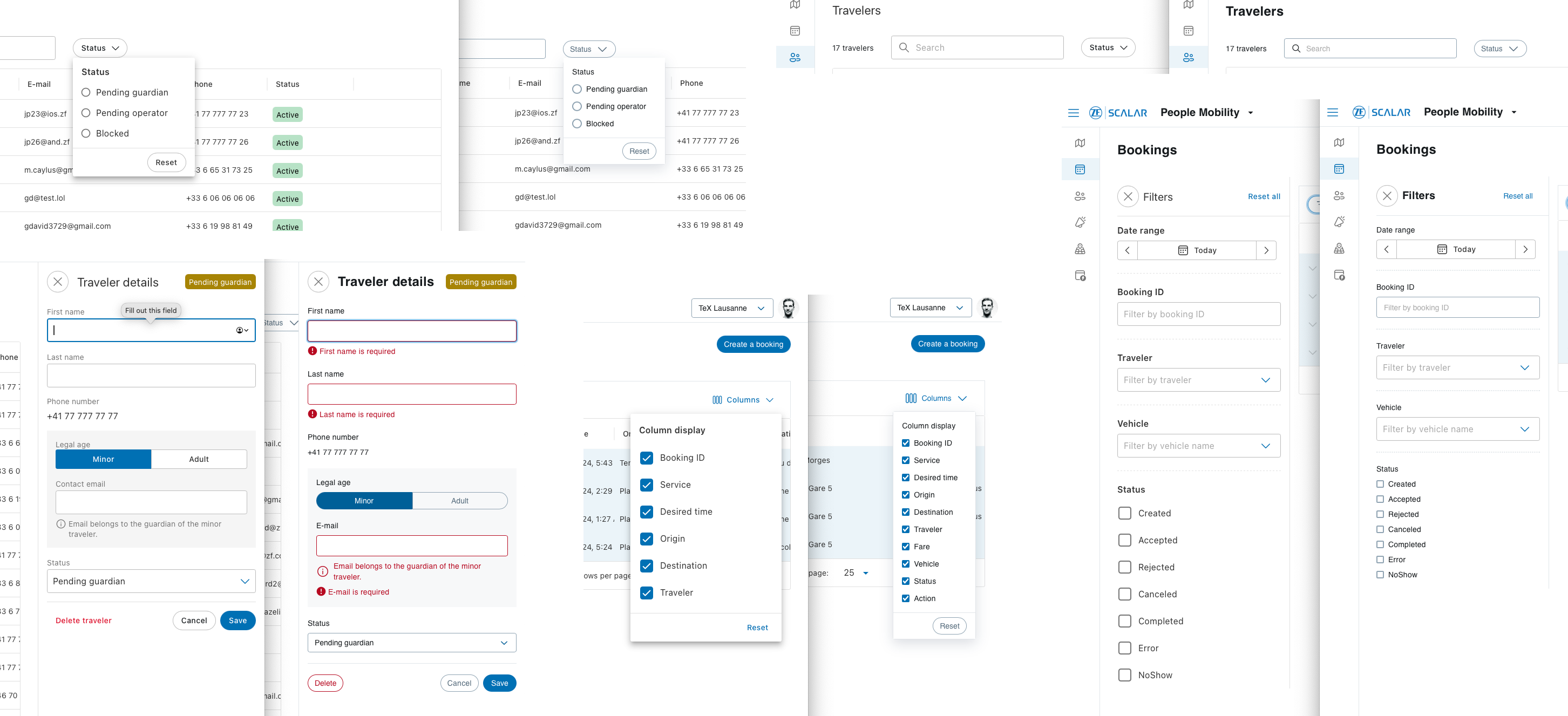
My first assignment was to implement React components for the new design system, code-named “Velocity”. It was not the most exciting work, but it got me up to speed with the chosen frameworks, which made me much more effective once I started using the design system. We built on Adobe React Spectrum with plain CSS (no Sass), extracted design tokens from Figma, and documented everything in Storybook. For the first time in my career, the design system supported both a light and a dark theme from day one.
In two months, I built the tabs, link, select, multi-select, divider, menu, popover, tag, avatar, badge and radio group components, and did substantial work on button, switch, radio, checkbox and form. That laid the groundwork for using the design system in an existing app, which was my next task.
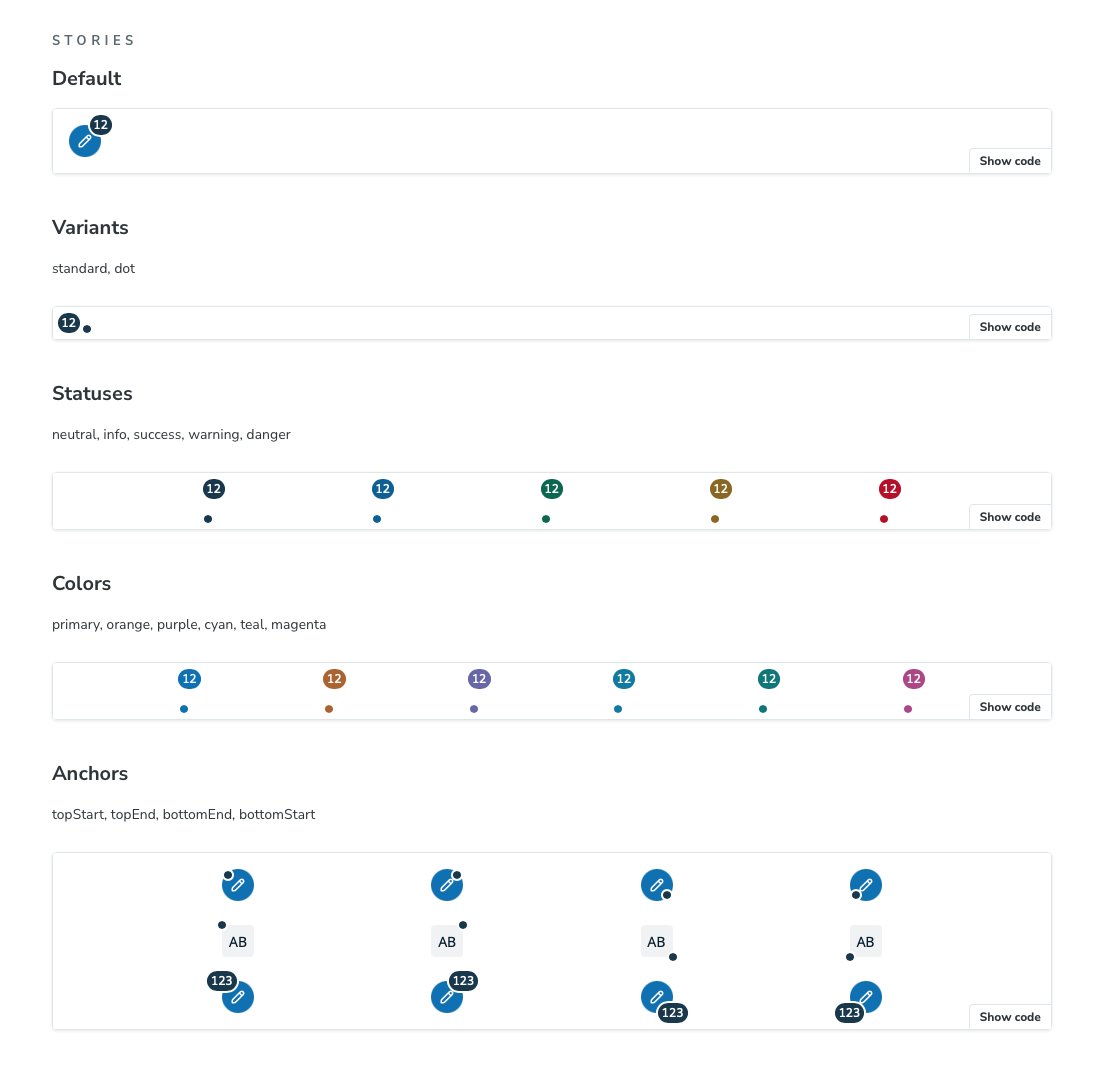
I also restructured parts of the documentation, added a pre-commit hook that runs the tests and enforces a commit message convention, and, as usual with low test coverage, found and fixed plenty of bugs.
People Mobility
Exactly three years after leaving Bestmile, I was back working on a fleet orchestration UI. This was its fourth iteration: the first predated my time at Bestmile, the second was the one I helped build there, the third was a partial migration to ZF, and this fourth one would fully replace the Bestmile apps.
The tech stack of the People Mobility web app:
- version control: GitLab
- dependency management: pnpm, with automated updates by Renovate
- language: TypeScript
- framework: React 18
- build tools: Vite and Nx
- API layer: OpenAPI and TanStack Query
- routing: React Router
- maps: deck.gl, luma.gl, react-map-gl and Turf.js
- authentication: Auth0
- feature flags: Unleash
- unit tests: Vitest, Testing Library, Faker and Mock Service Worker
- internationalization: i18next
- translations: Crowdin
- documentation: Storybook
- linting and formatting: ESLint and Prettier
That is a list of mature, well-established tools, which is exactly how I like it. Having everything in TypeScript, down to the generated API clients and types, is a real comfort. Faker and Mock Service Worker were new to me, and they make it much easier to write meaningful unit tests.
Beyond my usual priorities of good test coverage, consistent code and proper documentation, I got to:
- build a system that saves user preferences in local storage (open panels, panel sizes, filters, visible map layers, visible table columns, and so on), which made a big difference to the user experience
- overhaul how languages are loaded: until then, every language file was loaded on every page
- add access checks throughout the app
|                               | Dispatcher | Booking Agent | Cargo Planner |
| ----------------------------- | ---------- | ------------- | ------------- |
| PeopleMobility app            | ╳          | ╳             |               |
| Bookings module               | ╳          | ╳             |               |
| Dispatching module            | ╳          | ╳             |               |
| Scheduling module             | ╳          |               |               |
| Services module               | ╳          |               |               |
| Travelers module              | ╳          | ╳             |               |
| Planning module               |            |               | ╳             |
| TravelerAnnouncements feature | ╳ | | |Unit test output, phrased as specifications
Services > renders a list of active services
Services > when a service is selected > renders a "General" tab (selected by default) with a form
Services > when a service is selected > then the general properties are changed > shows a changelog
Services > when a service is selected > then the general properties are changed > then the change is submitted and the call fails > shows an error
Services > when a service is selected > then the general properties are changed > then the change is submitted and the call succeeds > sends the correct data to the server
Services > when a service is selected > then the "Service hours" tab is selected > renders a form
Services > when a service is selected > then the "Service hours" tab is selected > then the weekly-recurring service hours are changed > shows a changelog
Services > when a service is selected > then the "Service hours" tab is selected > then the weekly-recurring service hours are changed > then the change is submitted > sends the correct data to the server
Services > when a service is selected > then the "Service hours" tab is selected > then service hours are changed to be daily-recurring > shows a changelog
Services > when a service is selected > then the "Service hours" tab is selected > then service hours are changed to be daily-recurring > then the change is submitted > sends the correct data to the server
Services > when a service is selected > then the "Service hours" tab is selected > then service hours are changed to be non-stop > shows a changelog
Services > when a service is selected > then the "Service hours" tab is selected > then service hours are changed to be non-stop > then the change is submitted > sends the correct data to the server
Services > when a service is selected > then the "Service area" tab is selected and the form expanded > renders a form and a map
Services > when a service is selected > then the "Service area" tab is selected and the form expanded > then service area is changed > shows a changelog
Services > when a service is selected > then the "Service area" tab is selected and the form expanded > then service area is changed > then the change is submitted > sends the correct data to the server
Services > when a service is selected > then the "Dispatching parameters" tab is selected > renders a form
Services > when a service is selected > then the "Dispatching parameters" tab is selected > then the dispatching parameters are changed > shows a changelog
Services > when a service is selected > then the "Dispatching parameters" tab is selected > then the dispatching parameters are changed > then the change is submitted > sends the correct data to the server
Services > when a service is selected > then the "Service stops" tab is selected and the form expanded > renders a form, a paginated table, and a map with a places layer
Services > when a service is selected > then the "Service stops" tab is selected and the form expanded > then the maximum walking distance is changed > shows a changelog
Services > when a service is selected > then the "Service stops" tab is selected and the form expanded > then the maximum walking distance is changed > then the change is submitted > sends the correct data to the server
Services > when a service is selected > then the "Service stops" tab is selected and the form expanded > then a row is unselected > shows a changelog
Services > when a service is selected > then the "Service stops" tab is selected and the form expanded > then a row is unselected > then the change is submitted > calls the right endpoint
Services > when a service is selected > then the "Service stops" tab is selected and the form expanded > then a row is selected > shows a changelog
Services > when a service is selected > then the "Service stops" tab is selected and the form expanded > then a row is selected > then the change is submitted > calls the right endpoint
Services > when a service is selected > then the "Service stops" tab is selected and the form expanded > then a query is typed into the places filter > filters the table
Services > when a service is selected > then the "Service stops" tab is selected and the form expanded > then a row in the table is clicked > shows a marker on the map
Services > when a service is selected > then the "Pricing configuration" tab is selected > renders a form
Services > when a service is selected > then the "Pricing configuration" tab is selected > then the pricing parameters are changed > shows a changelog
Services > when a service is selected > then the "Pricing configuration" tab is selected > then the pricing parameters are changed > then the change is submitted > sends the correct data to the server
Services > when a coordinate-based service is selected > does not render a "Service stops" tab
Services > when a station-based service is selected > renders a "Service stops" tab
Services > when a disabled service is activated > shows a confirmation dialog
Services > when an active service is disabled > shows a confirmation dialog
Services > when the button to create a new service is clicked and the form is filled > then the form is submitted and the call fails > shows an error
Services > when the button to create a new service is clicked and the form is filled > then the form is submitted and the call succeeds > sends the correct data to the server
Services > when the organization has no pricing models and a service is selected > does not render a "Pricing configuration" tab
Services > when the organization has pricing models and a service is selected > renders a "Pricing configuration" tab
Bookings > displays a loader, then a bookings table, and a button to create a booking
Bookings > when a row is expanded, and the booking has no ride and no traveler > displays the booking details
Bookings > when a row is expanded, and the booking has a ride > displays the ride details
Bookings > when a row is expanded, and the booking has a traveler > displays the traveler details
Bookings > when the search by traveler name is used > applies the search
Bookings > when the search by vehicle name is used > applies the search
Bookings > when the filters are used > applies the filters
Bookings > when the booking ID filter is used > disables the date range filter and applies the booking ID filter
Bookings > when there is a booking ID filter in the URL > disables the date range filter and applies the booking ID filter
Bookings > when the column filter is used > applies the column filter
Bookings > then a ride rematch is requested, and it succeeds > shows a confirmation
Bookings > then a ride rematch is requested, and it fails > shows a dialog
Bookings > then a ride rematch is requested, and it fails > then the booking is canceled, and the API call fails > shows an errorBookingCreation > when no fare options are returned > displays the first step of the booking creation funnel
BookingCreation > when no fare options are returned > then an existing traveler is selected > pre-fills the traveler form
BookingCreation > when no fare options are returned > then an existing traveler is selected > then the form is modified > displays a warning
BookingCreation > when no fare options are returned > then an existing traveler is selected > then the form is modified > then the option to create a new traveler is selected and the form is submitted > displays validation errors
BookingCreation > when no fare options are returned > then an existing traveler is selected > then the form is modified > then the option to create a new traveler is selected and the form is submitted > then the form is correctly filled, a wheelchair passenger is added, and the form is submitted > displays the second step of the booking creation funnel
BookingCreation > when no fare options are returned > then an existing traveler is selected > then the form is modified > then the option to create a new traveler is selected and the form is submitted > then the form is correctly filled, a wheelchair passenger is added, and the form is submitted > then the second step is completed by searching for an origin and a destination, but the quote request fails > shows the errors
BookingCreation > when no fare options are returned > then an existing traveler is selected > then the form is modified > then the option to create a new traveler is selected and the form is submitted > then the form is correctly filled, a wheelchair passenger is added, and the form is submitted > then the second step is completed by searching for an origin and a destination, and by entering a desired journey start time, as well as specifying custom time deviations and not overriding service hours > creates a quote and displays the third step of the booking creation funnel
BookingCreation > when no fare options are returned > then an existing traveler is selected > then the form is modified > then the option to create a new traveler is selected and the form is submitted > then the form is correctly filled, a wheelchair passenger is added, and the form is submitted > then the second step is completed by searching for an origin and a destination, and by entering a desired journey start time, as well as specifying custom time deviations and not overriding service hours > then a service is selected > then the booking succeeds > displays a booking confirmation
BookingCreation > when no fare options are returned > then an existing traveler is selected > then the form is modified > then the option to create a new traveler is selected and the form is submitted > then the form is correctly filled, a wheelchair passenger is added, and the form is submitted > then the second step is completed by searching for an origin and a destination, and by entering a desired journey start time, as well as specifying custom time deviations and not overriding service hours > then a service is selected > then the booking succeeds > then the user starts over > displays the first step of the booking creation funnel
BookingCreation > when no fare options are returned > then an existing traveler is selected > then the form is modified > then the option to create a new traveler is selected and the form is submitted > then the form is correctly filled, a wheelchair passenger is added, and the form is submitted > then the second step is completed by searching for an origin and a destination, and by entering a desired journey start time, as well as specifying custom time deviations and not overriding service hours > then a service is selected > then the booking fails > displays a booking rejection
BookingCreation > when no fare options are returned > then an existing traveler is selected > then the form is modified > then the option to create a new traveler is selected and the form is submitted > then the form is correctly filled, a wheelchair passenger is added, and the form is submitted > then the second step is completed by searching for an origin and a destination, and by entering a desired journey start time, as well as specifying custom time deviations and not overriding service hours > then the user backtracks > displays the second step of the booking creation funnel
BookingCreation > when no fare options are returned > then an existing traveler is selected > then the form is modified > then the option to create a new traveler is selected and the form is submitted > then the form is correctly filled, a wheelchair passenger is added, and the form is submitted > displays the second step of the booking creation funnel with the traveler’s recent booking(s)
BookingCreation > when no fare options are returned > then an existing traveler is selected > then the form is modified > then the option to create a new traveler is selected and the form is submitted > then the form is correctly filled, a wheelchair passenger is added, and the form is submitted > then the second step is completed by selecting a recent booking > creates a quote and displays the third step of the booking creation funnel
BookingCreation > when no fare options are returned > then an existing traveler is selected > then the form is modified > then the option to create a new traveler is selected and the form is submitted > then the form is correctly filled, a wheelchair passenger is added, and the form is submitted > then the user backtracks > displays the first step of the booking creation funnel, still filled
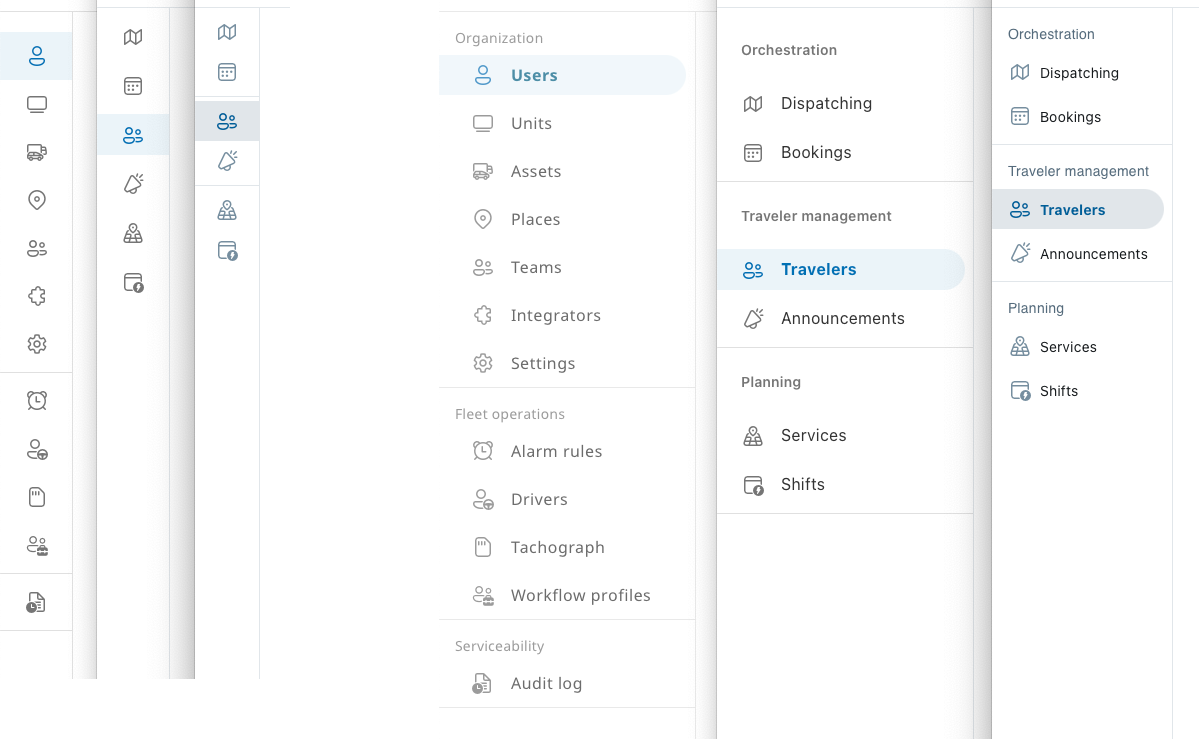
BookingCreation > when fare options are returned > then an existing traveler is selected, fare options are selected, a wheelchair space is requested, and the first step is submitted > then the second step is completed by searching for an origin and a destination > creates a quote and displays the third step of the booking creation funnelFor several months, migrating the whole UI to the new design system ran in the background of my other work. Design system migrations seem to be a recurring theme in my career.
Bookings
One of my first features was the booking creation funnel. Compared with the Bestmile version, it added wheelchair bookings, configurable fare options (adult, child, dog, and so on) and the ability to reuse a past booking.
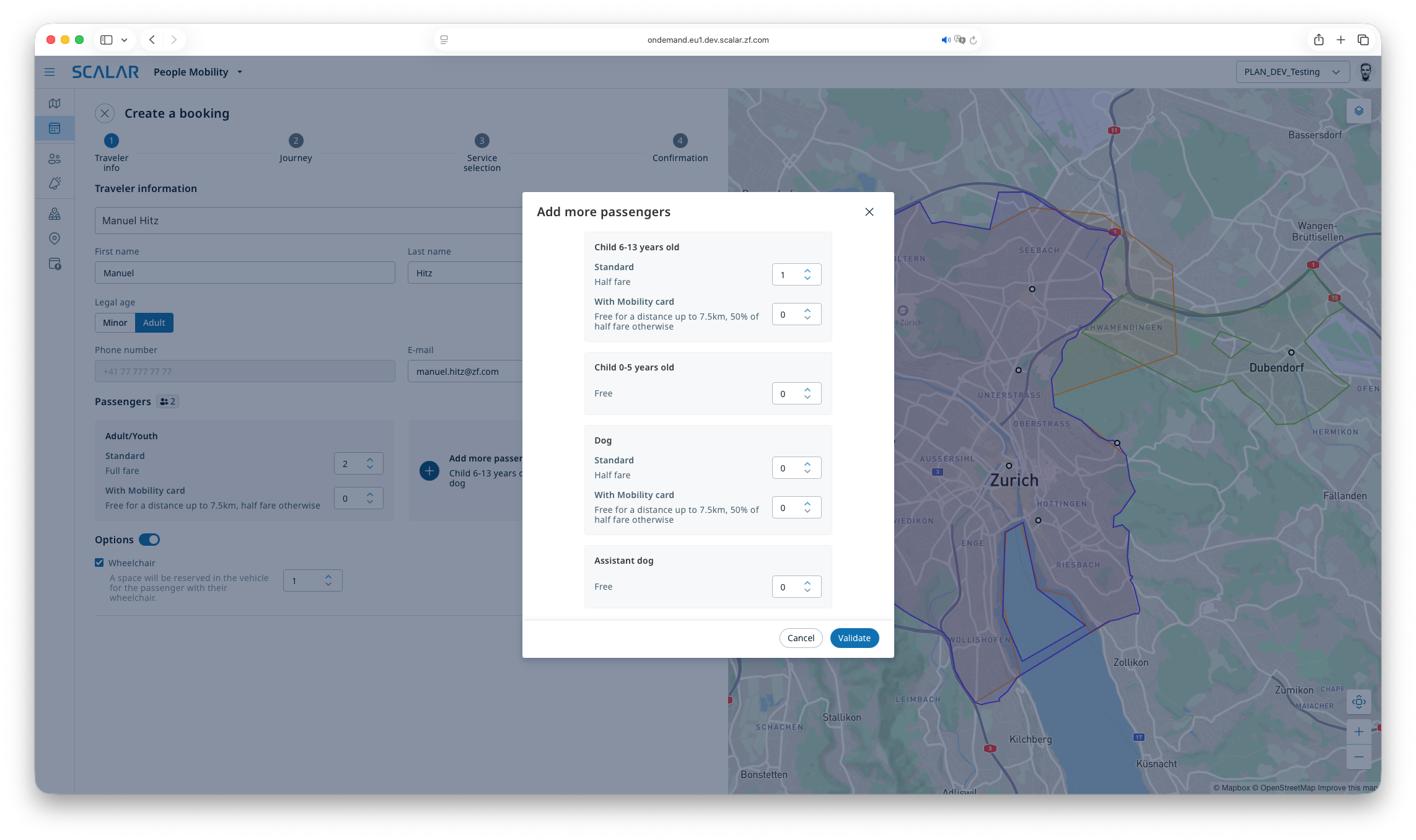
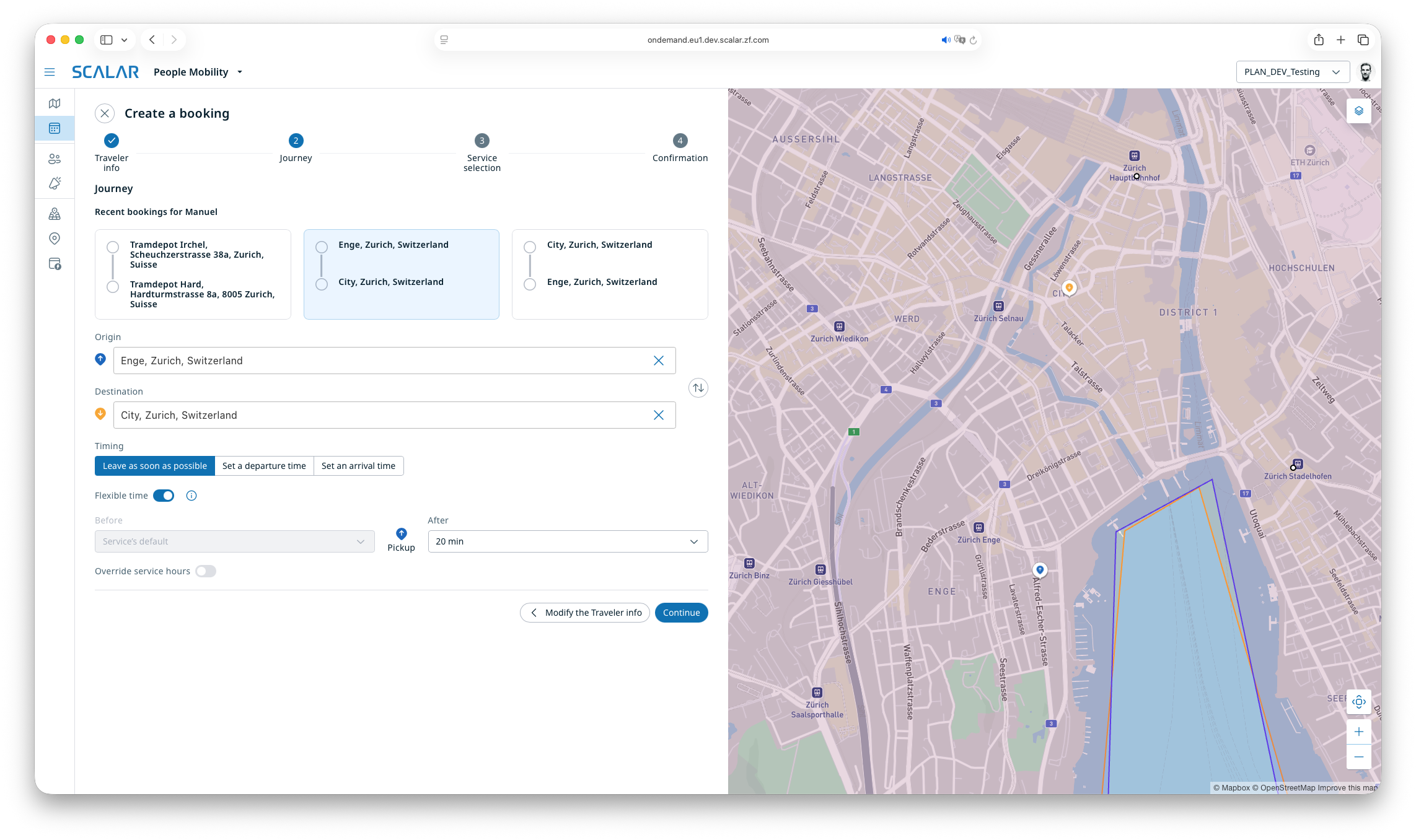
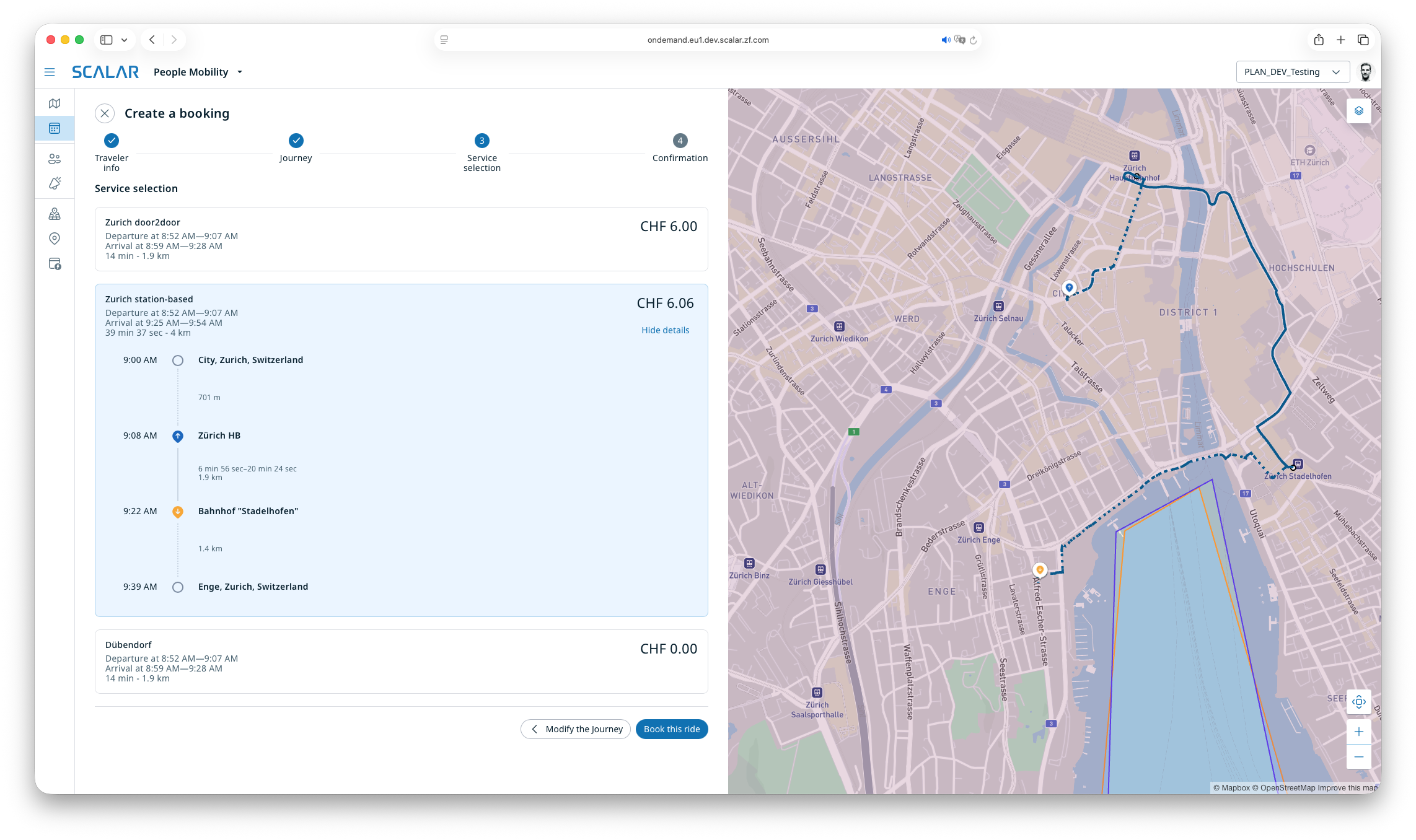
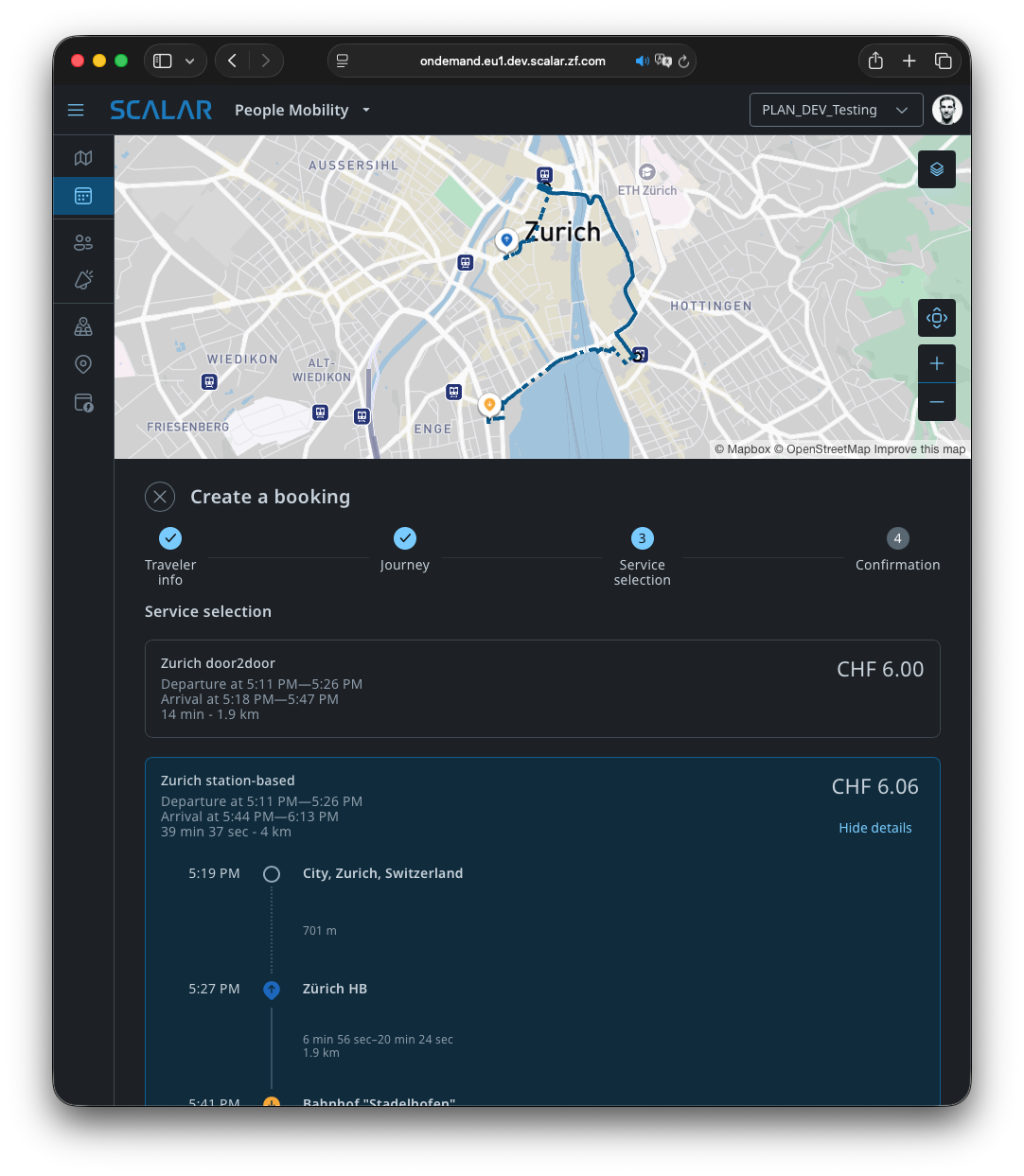
I made the whole funnel responsive, with the map on top on narrow screens instead of on the right, and the new design system gave us a dark theme for free.
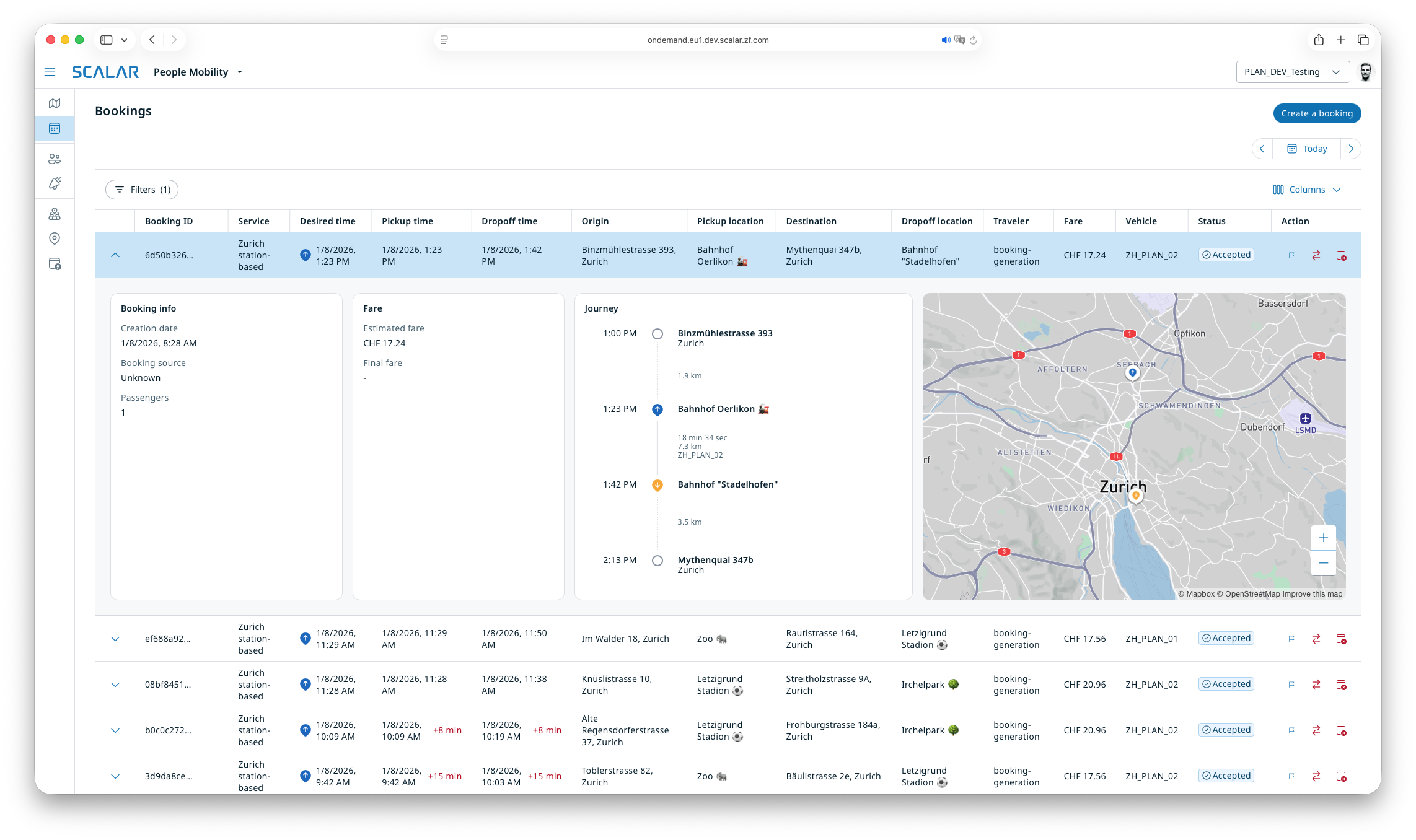
A first version of the bookings list already existed. I added features such as ride rematching, for example to handle incidents, and ride flagging.
Traveler management
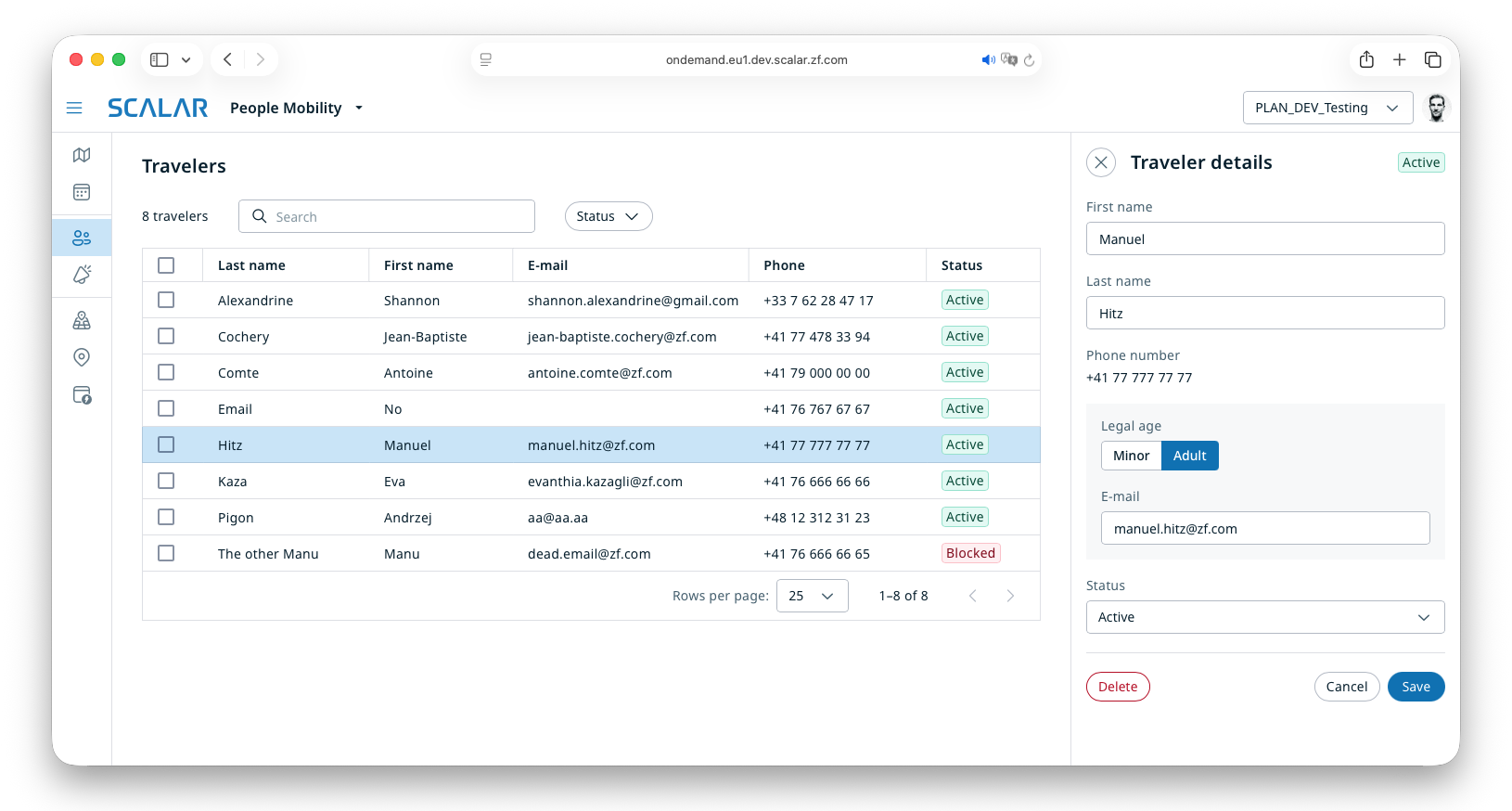
Listing and editing travelers already existed, so I only added the ability to delete a traveler.
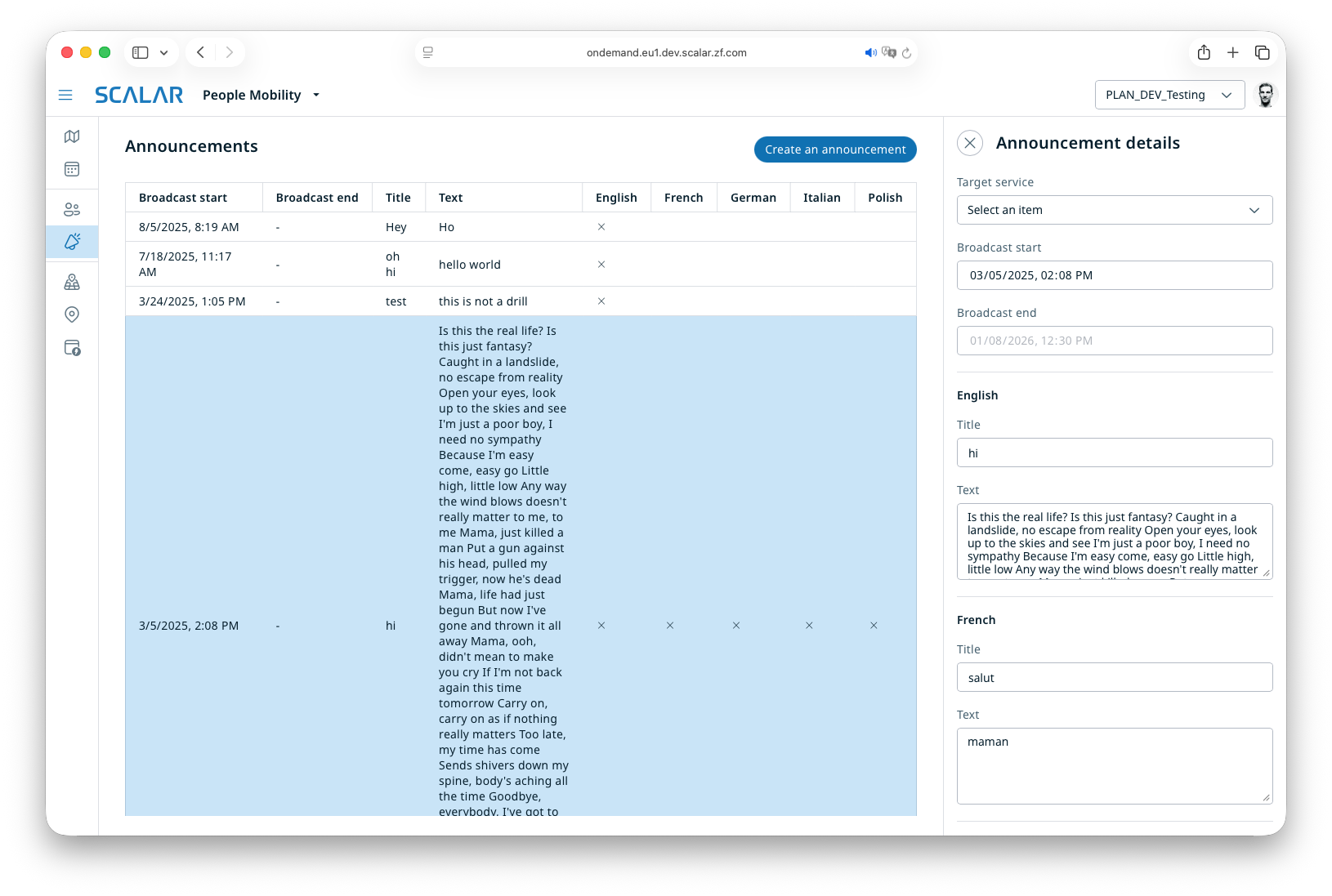
Bestmile had a simple announcement system to show messages to users of the ride-hailing traveler apps. I ported it to the People Mobility app.
Service configuration
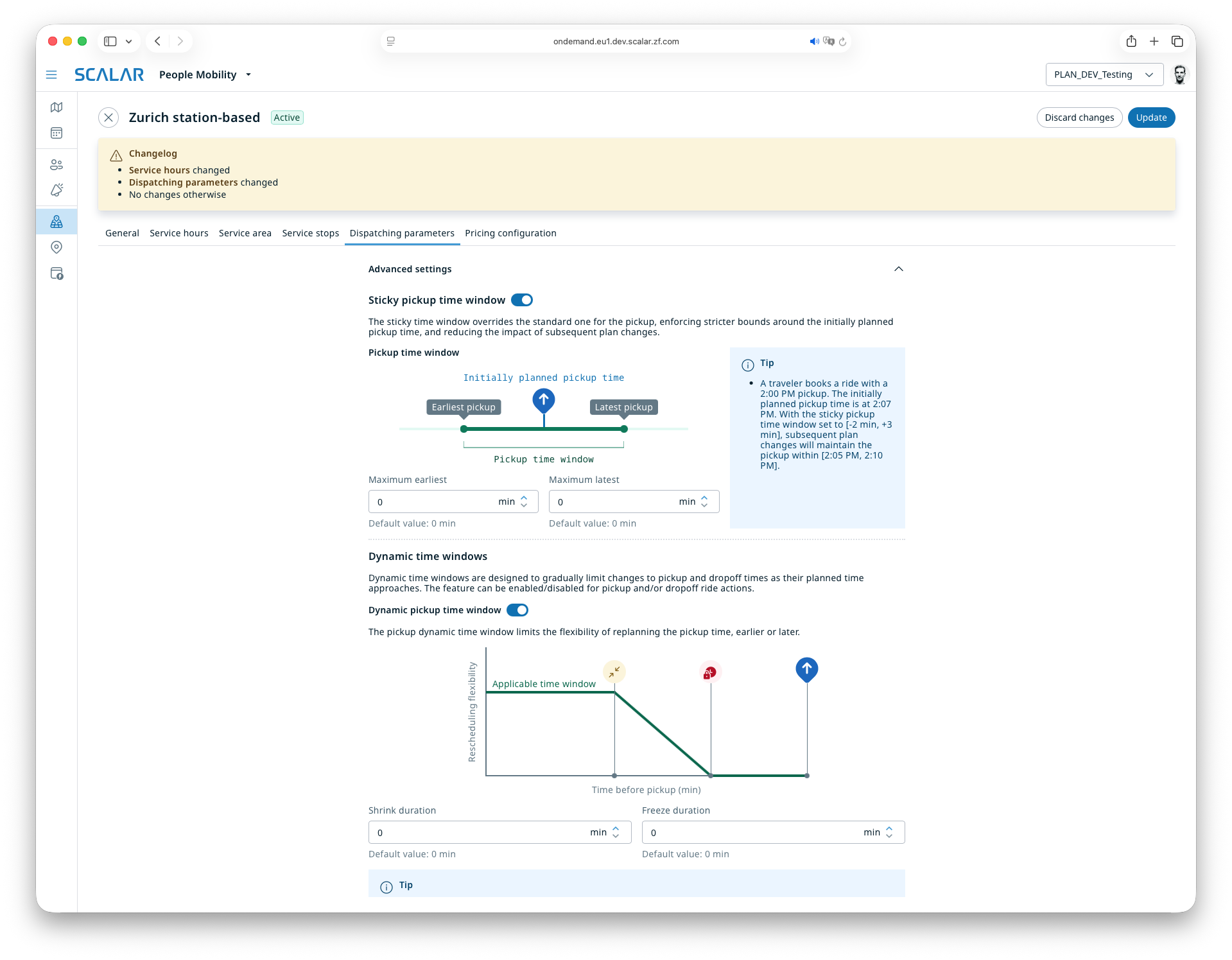
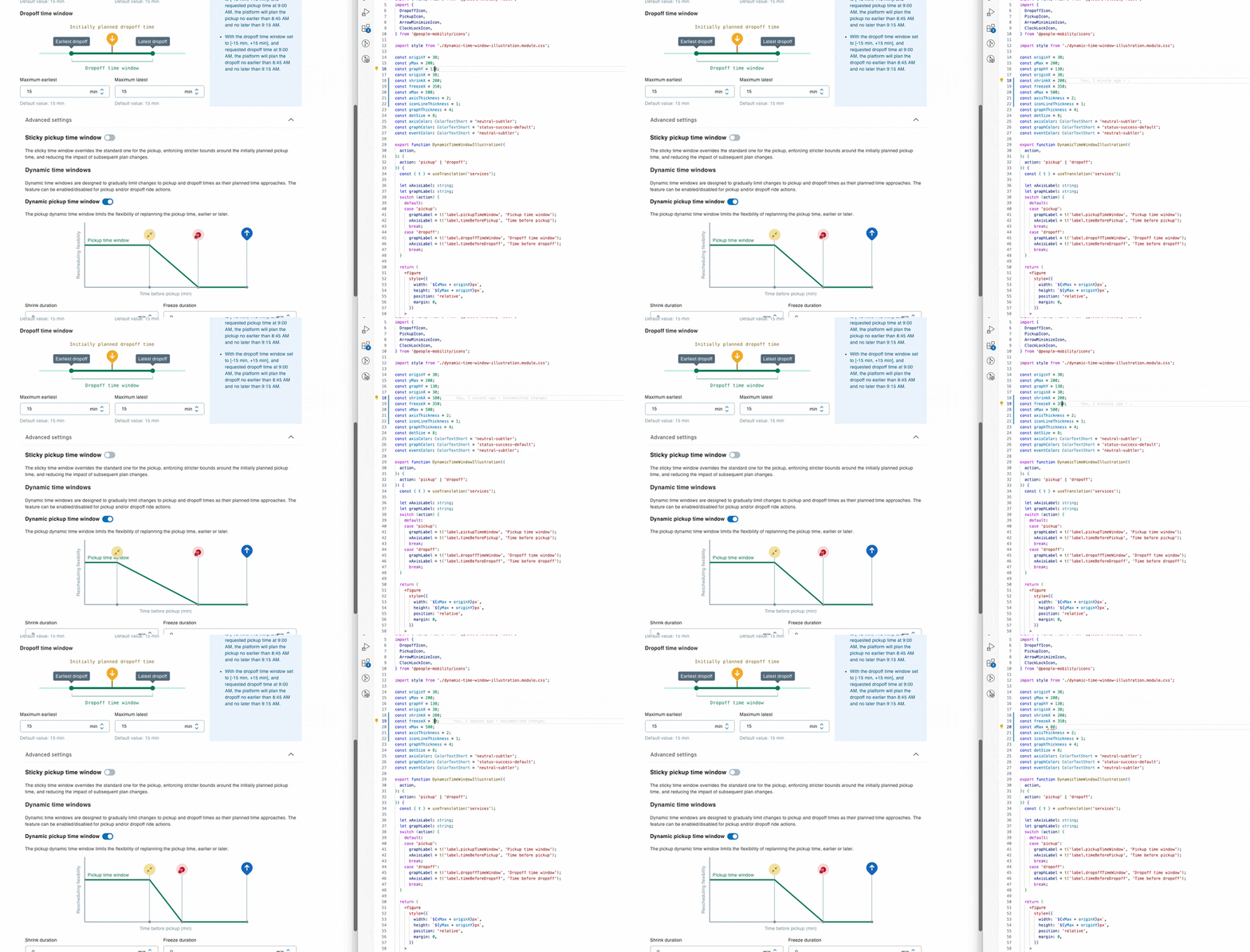
Next came the service configuration screens. I enjoyed creating SVG diagrams to explain the dispatching parameters. I wanted them to adapt dynamically to the values the user enters; the team preferred static illustrations, but the code still supports it.
Another fun but tricky piece was the three-way percentage split of the optimization weights: changing one value adjusts the other two, unless they are locked.
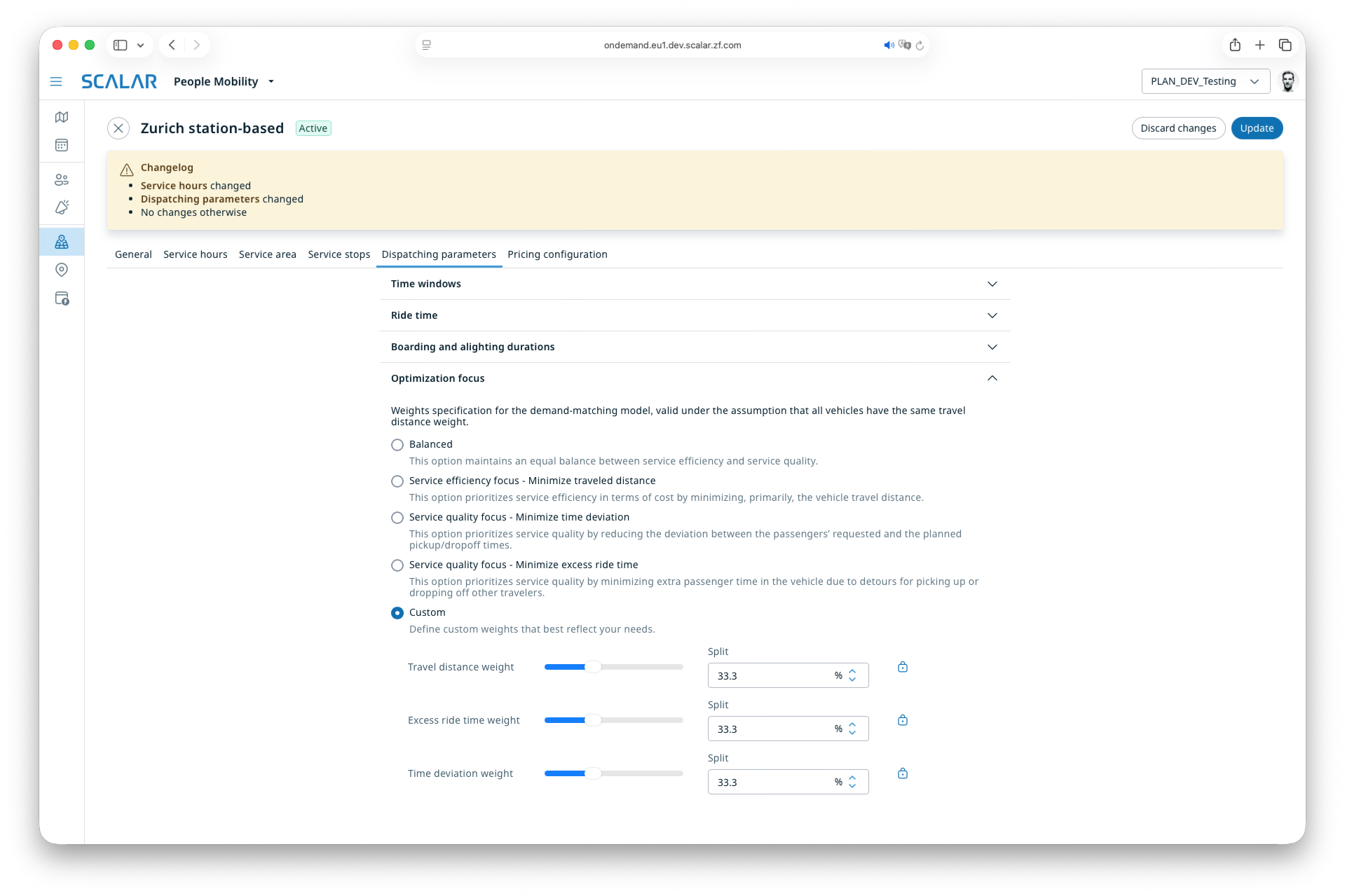
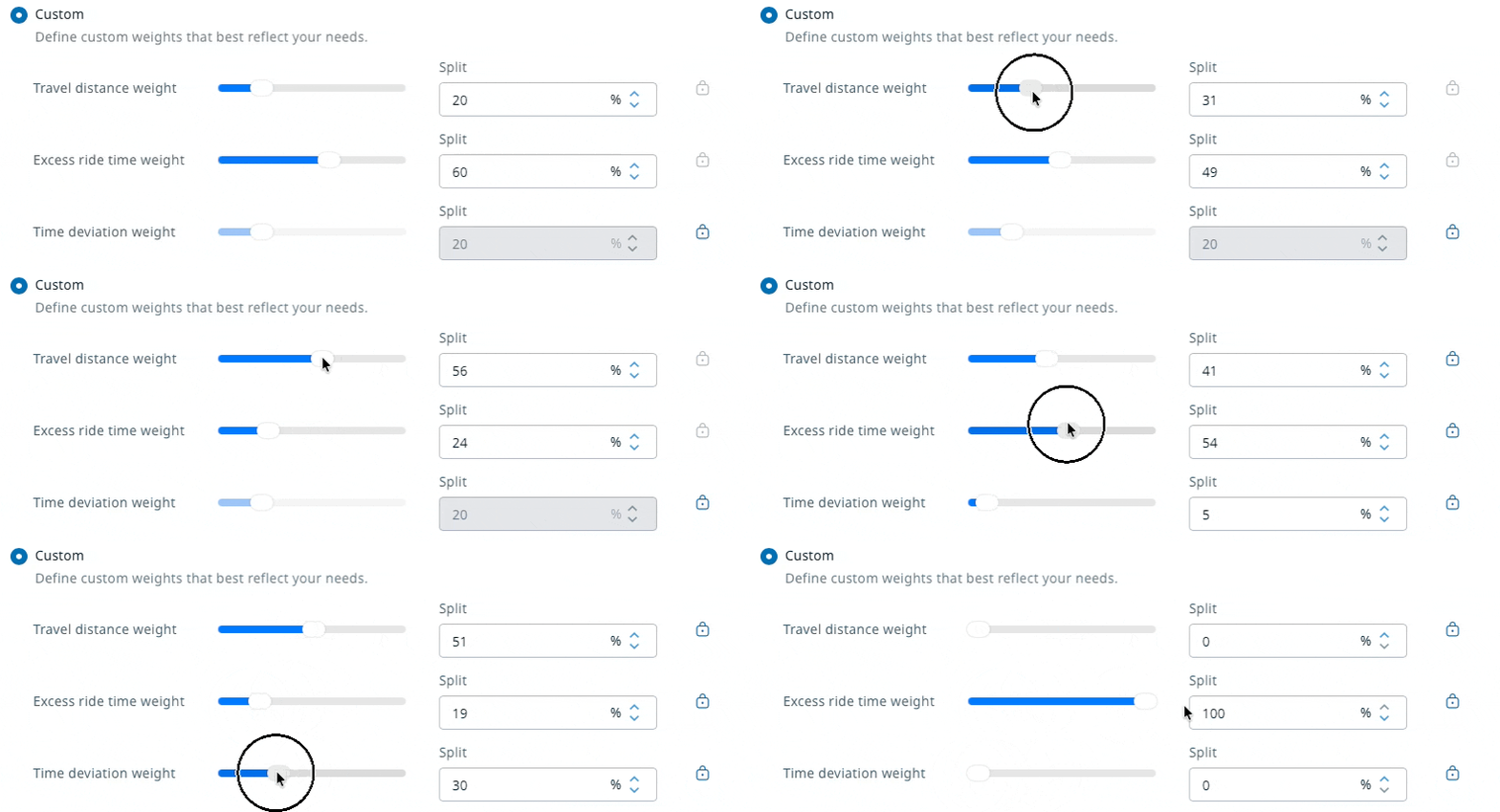
The three-way percentage split, with its tests
export function threeWayPercentageSplit(
  a: { value: number; newValue: number },
  b: { value: number; locked: boolean },
  c: { value: number; locked: boolean },
): { a: number; b: number; c: number } {
  if (!b.locked && !c.locked) {
    const delta = a.value - a.newValue;
    if (c.value > b.value) {
      const newB = Math.max(0, Math.min(b.value + delta / 2, 100));
      return {
        a: a.newValue,
        b: newB,
        c: 100 - a.newValue - newB,
      };
    } else {
      const newC = Math.max(0, Math.min(c.value + delta / 2, 100));
      return {
        a: a.newValue,
        b: 100 - a.newValue - newC,
        c: newC,
      };
    }
  }

  if (!b.locked) {
    const limitedNewA = Math.min(a.newValue, 100 - c.value);
    return {
      a: limitedNewA,
      b: 100 - limitedNewA - c.value,
      c: c.value,
    };
  }

  if (!c.locked) {
    const limitedNewA = Math.min(a.newValue, 100 - b.value);
    return {
      a: limitedNewA,
      b: b.value,
      c: 100 - limitedNewA - b.value,
    };
  }

  return { a: a.value, b: b.value, c: c.value };
}
describe('threeWayPercentageSplit', () => {
  describe('when A is changed, B and C are locked', () => {
    it('ignores the change', () => {
      expect(
        threeWayPercentageSplit(
          { value: 12, newValue: 34 },
          { value: 56, locked: true },
          { value: 32, locked: true },
        ),
      ).toEqual({ a: 12, b: 56, c: 32 });
    });
  });

  describe('when A is changed, B is not locked, but C is', () => {
    it('distributes the change to B', () => {
      expect(
        threeWayPercentageSplit(
          { value: 12, newValue: 34 },
          { value: 56, locked: false },
          { value: 32, locked: true },
        ),
      ).toEqual({ a: 34, b: 34, c: 32 });

      expect(
        threeWayPercentageSplit(
          { value: 12, newValue: 0 },
          { value: 56, locked: false },
          { value: 32, locked: true },
        ),
      ).toEqual({ a: 0, b: 68, c: 32 });

      expect(
        threeWayPercentageSplit(
          { value: 12, newValue: 100 },
          { value: 56, locked: false },
          { value: 32, locked: true },
        ),
      ).toEqual({ a: 68, b: 0, c: 32 });
    });
  });

  describe('when A is changed, B is locked, C is not', () => {
    it('distributes the change to C', () => {
      expect(
        threeWayPercentageSplit(
          { value: 12, newValue: 34 },
          { value: 56, locked: true },
          { value: 32, locked: false },
        ),
      ).toEqual({ a: 34, b: 56, c: 10 });

      expect(
        threeWayPercentageSplit(
          { value: 12, newValue: 0 },
          { value: 56, locked: true },
          { value: 32, locked: false },
        ),
      ).toEqual({ a: 0, b: 56, c: 44 });

      expect(
        threeWayPercentageSplit(
          { value: 12, newValue: 100 },
          { value: 56, locked: true },
          { value: 32, locked: false },
        ),
      ).toEqual({ a: 44, b: 56, c: 0 });
    });
  });

  describe('when A is changed, neither B nor C are locked', () => {
    it('distributes the change to B and C', () => {
      expect(
        threeWayPercentageSplit(
          { value: 12, newValue: 34 },
          { value: 56, locked: false },
          { value: 32, locked: false },
        ),
      ).toEqual({ a: 34, b: 45, c: 21 });

      expect(
        threeWayPercentageSplit(
          { value: 12, newValue: 0 },
          { value: 56, locked: false },
          { value: 32, locked: false },
        ),
      ).toEqual({ a: 0, b: 62, c: 38 });

      expect(
        threeWayPercentageSplit(
          { value: 12, newValue: 100 },
          { value: 56, locked: false },
          { value: 32, locked: false },
        ),
      ).toEqual({ a: 100, b: 0, c: 0 });
    });
  });
});
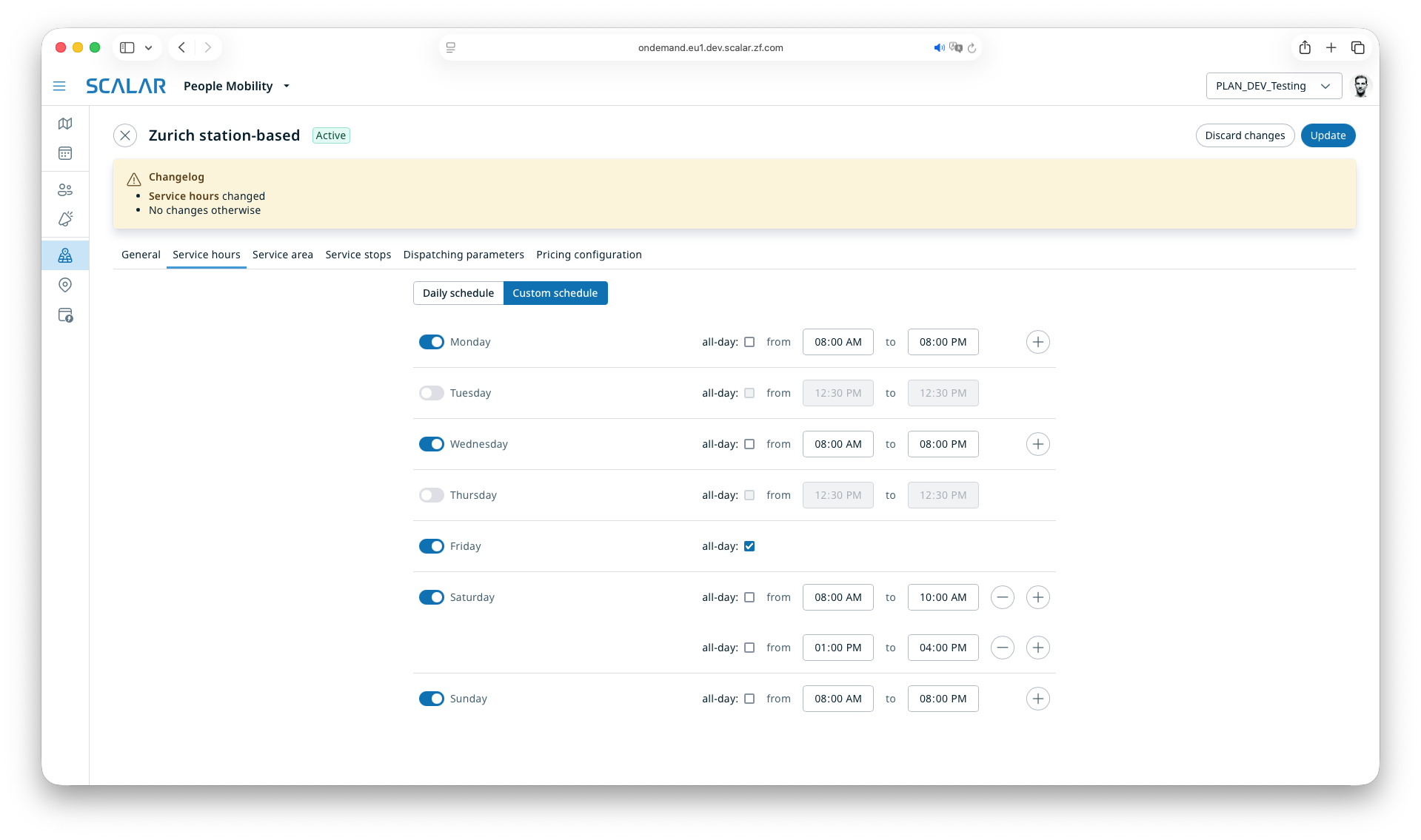
The last notable part of service configuration was service hours, the time slots during which a transportation service is available. It was a perfect use case for React Hook Form’s useFieldArray.
const { fields, append, remove, insert, update } = useFieldArray({
  control,
  name: 'hours',
});
Live operations
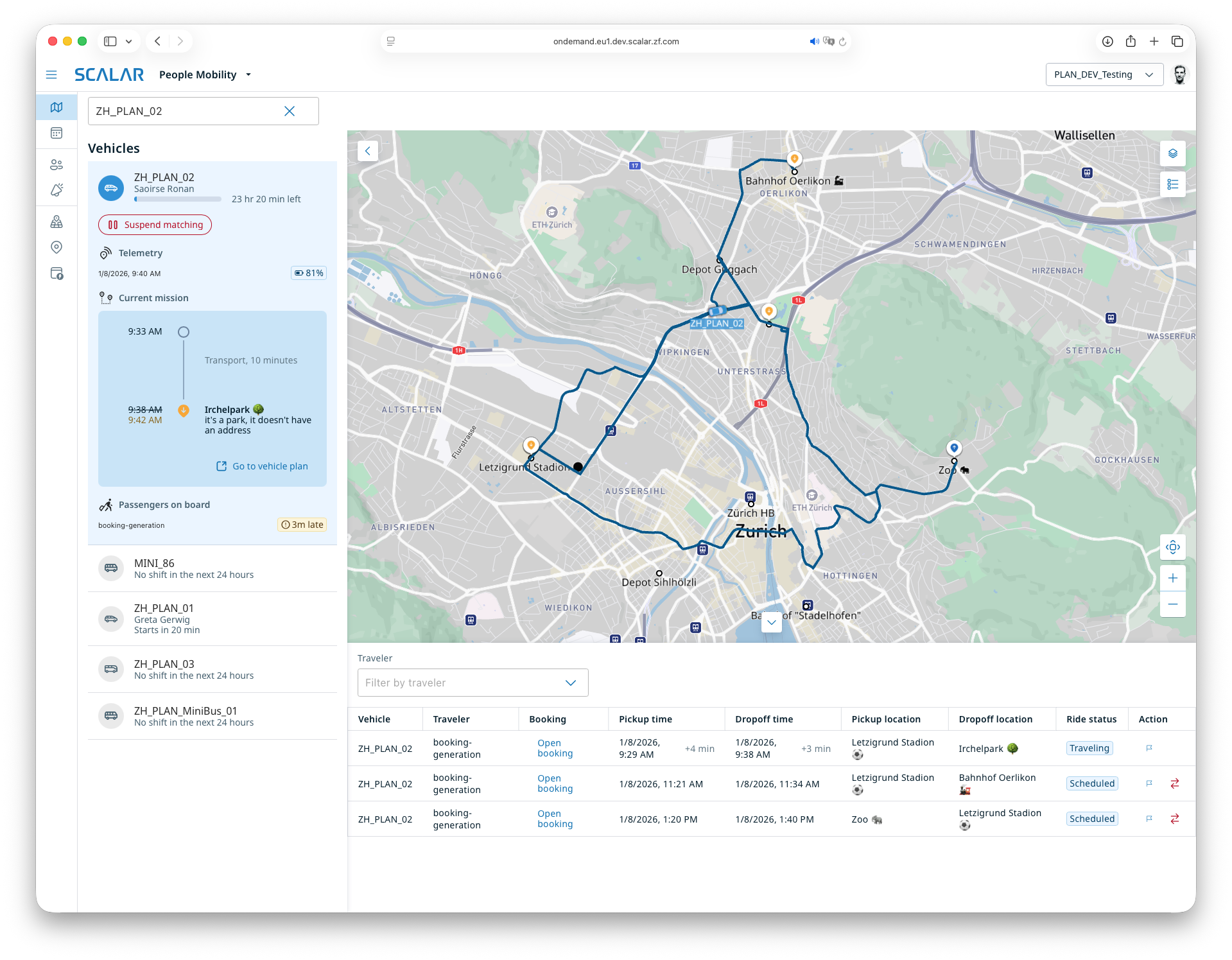
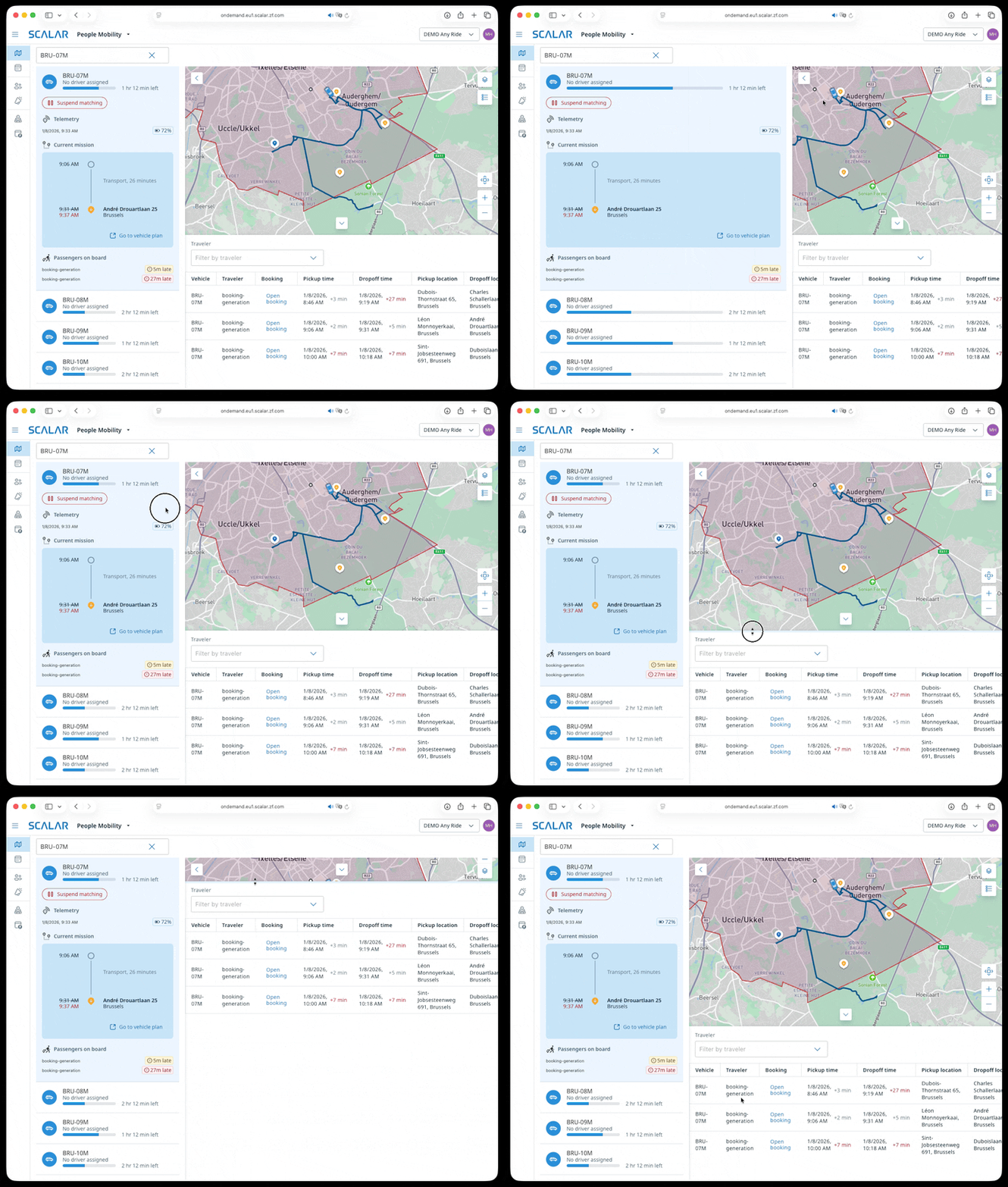
A basic version of the “Dispatching” screen already existed. I added many improvements, such as:
- the assigned and actual driver, vehicle status and shift progress
- details of the next mission when a vehicle is expanded
- flagging and rematching rides
- pausing and resuming a driver’s shift
- resizable panels, so users can make the most of their screen
Shift planning
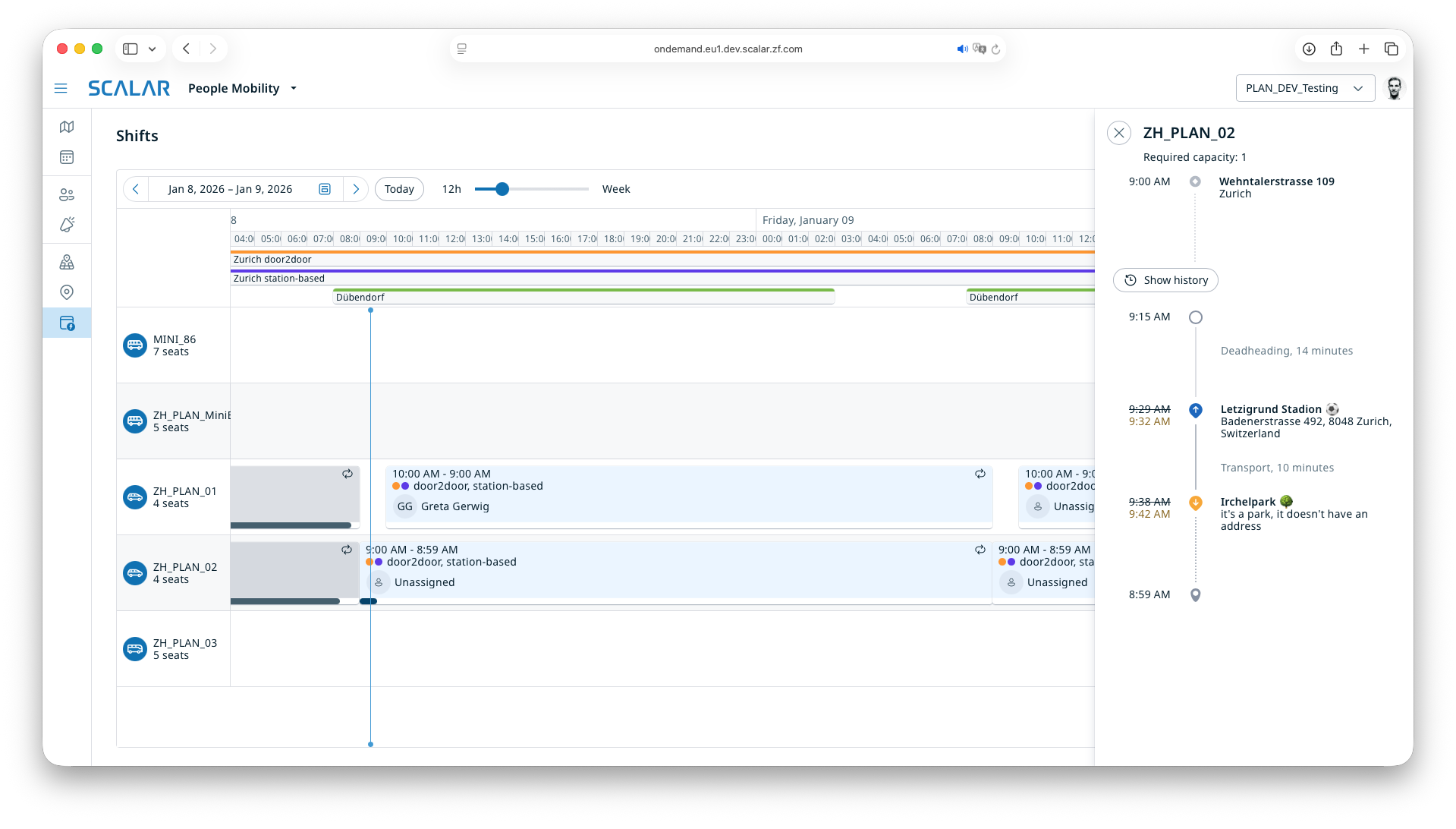
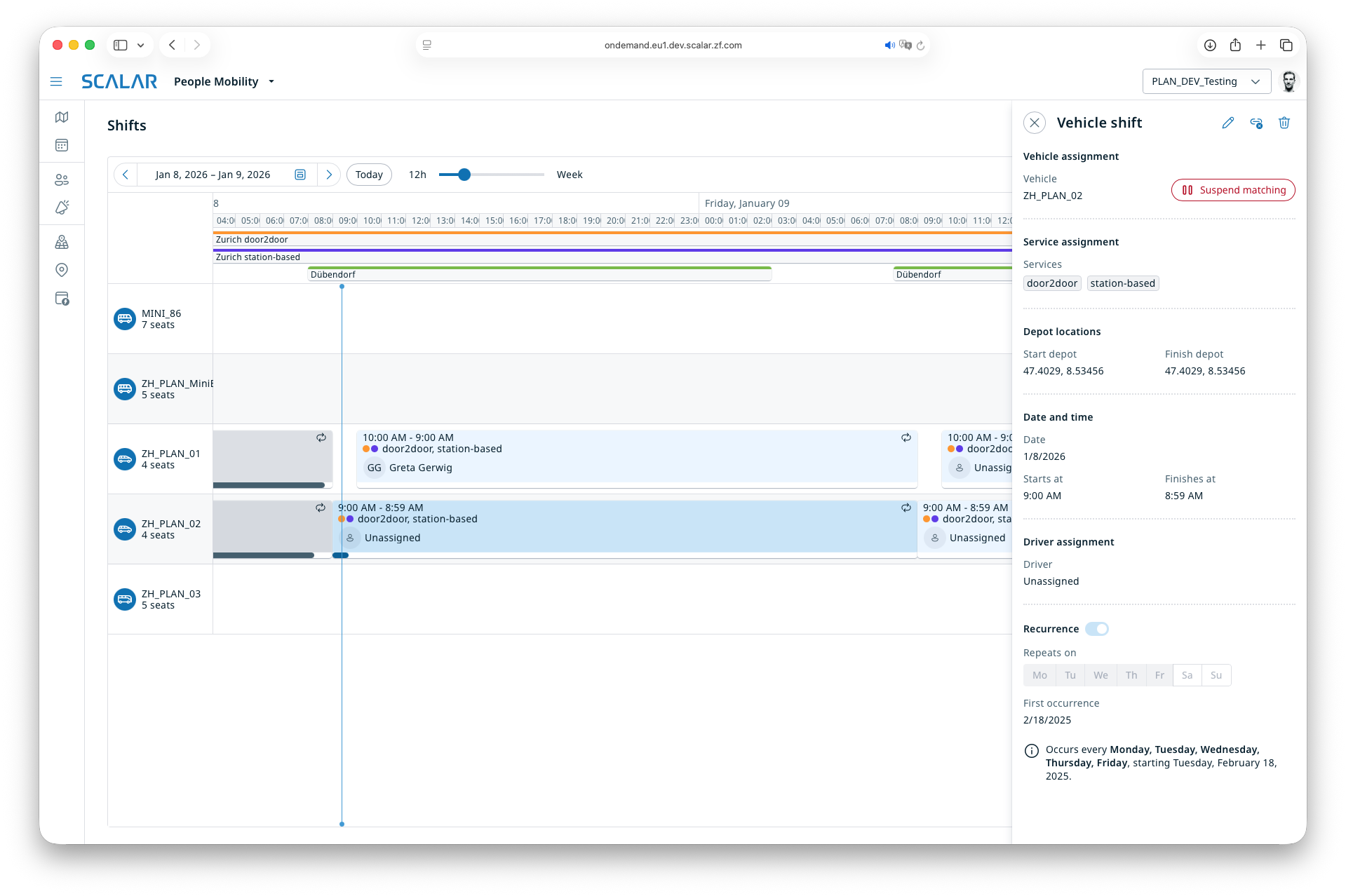
I was less involved in the “Shift planning” screen, but touched almost every corner of its code while fixing bugs, adding tests and migrating it to the new design system.
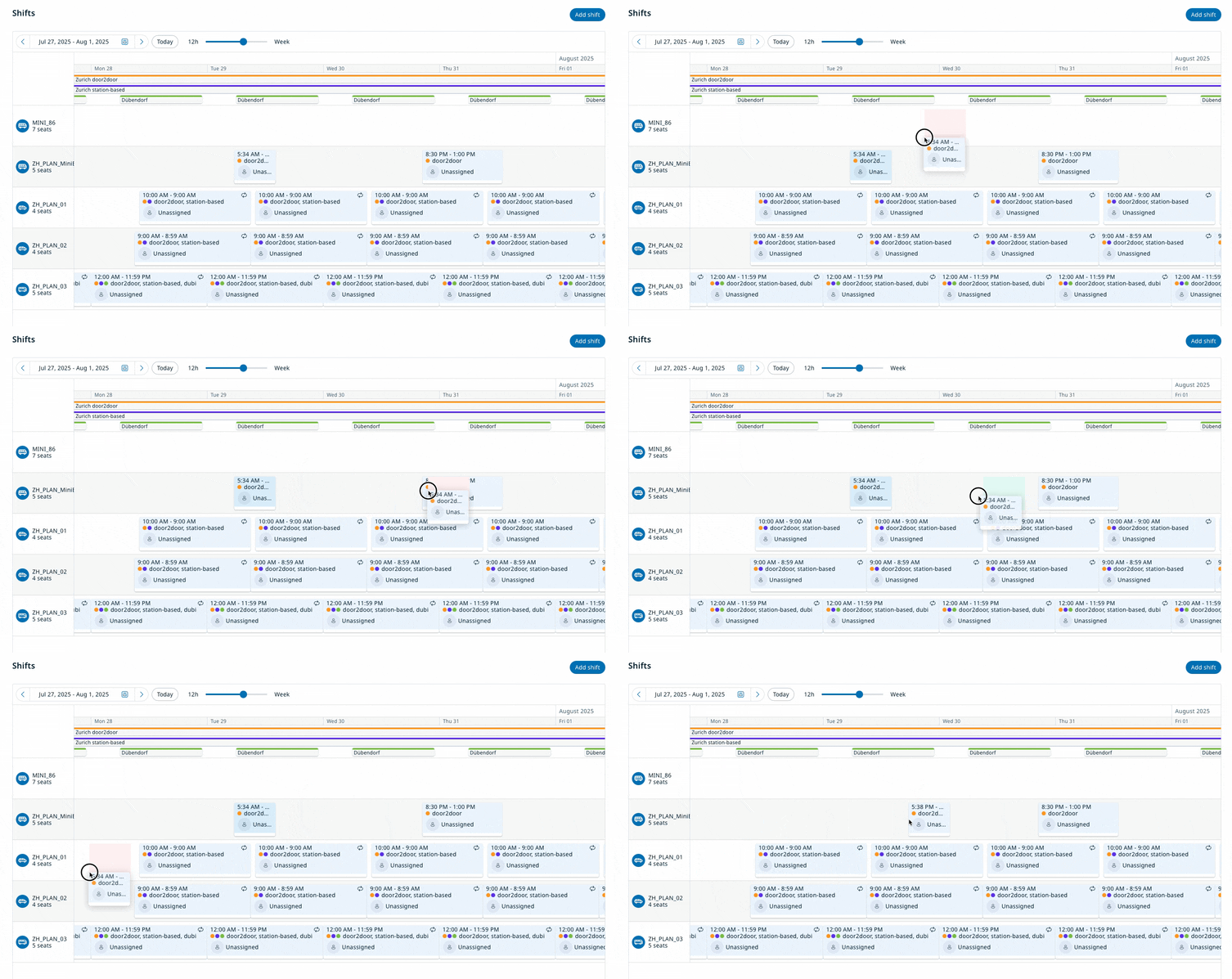
I also prototyped drag and drop for vehicle shifts, with a “ghost” element that turns green or red to show where a shift can be dropped. It never shipped, but the experiment informed the upcoming Cargo Planning app.
Cargo Planning
While I was finishing the migration of Bestmile features to People Mobility, the rest of the team started a proof of concept for Cargo Planning. I soon joined and worked on:
- order details in the order list, which turns into a table when the panel is wide enough
- drag and drop from the order list to the timeline, and within the timeline
- a mock API client generated from draft OpenAPI specs with mocked responses, later swapped for the real API and kept in sync as it evolved
- a trip preview showing the schedule suggested by the system before the user confirms or cancels
- detecting violations of pickup and delivery time windows, with matching warnings
- filtering timeline items by distance, and a filter panel
- support for translations
- a clean separation of modules and libraries in the monorepo shared with People Mobility
- accessibility improvements
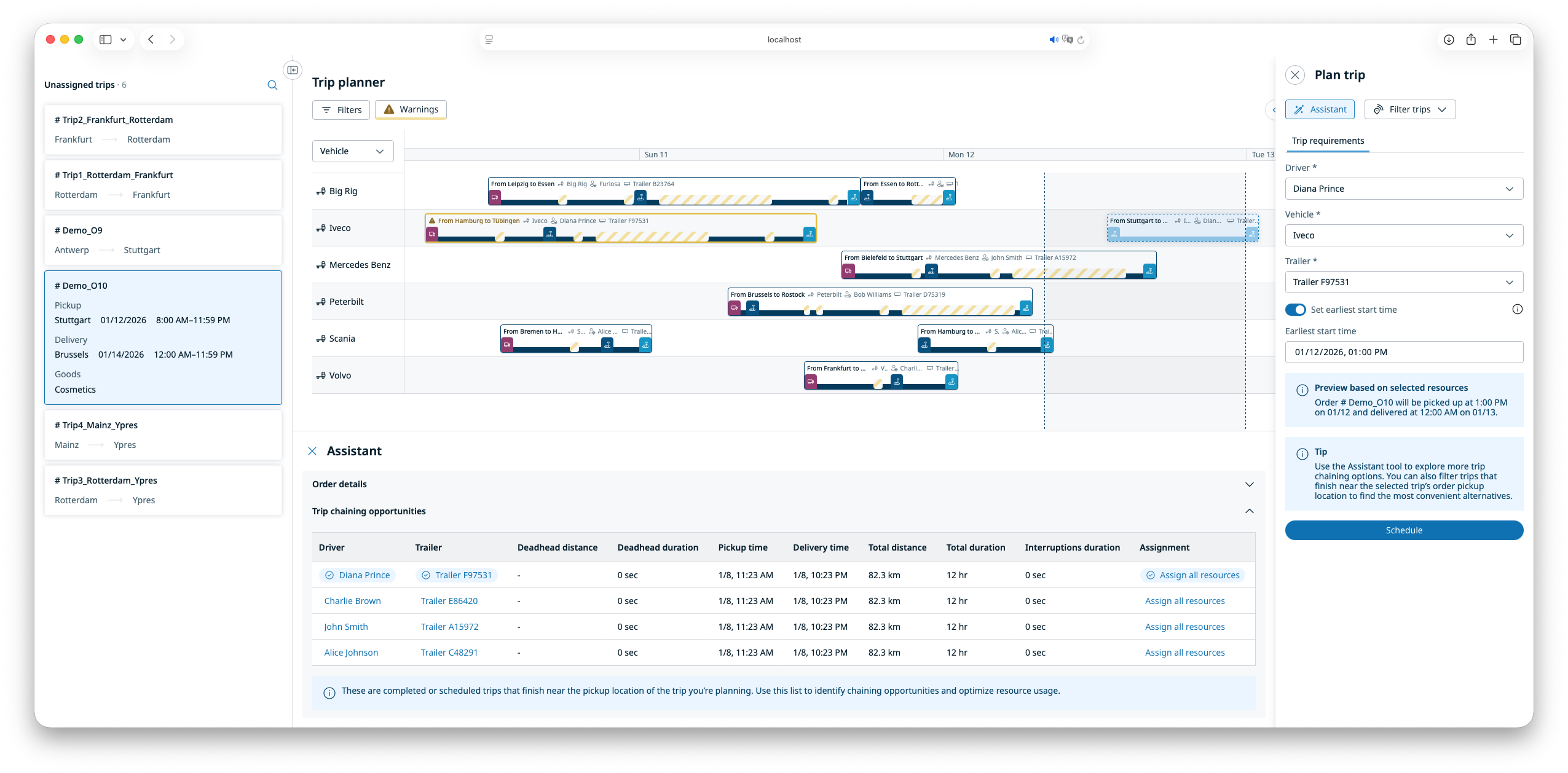
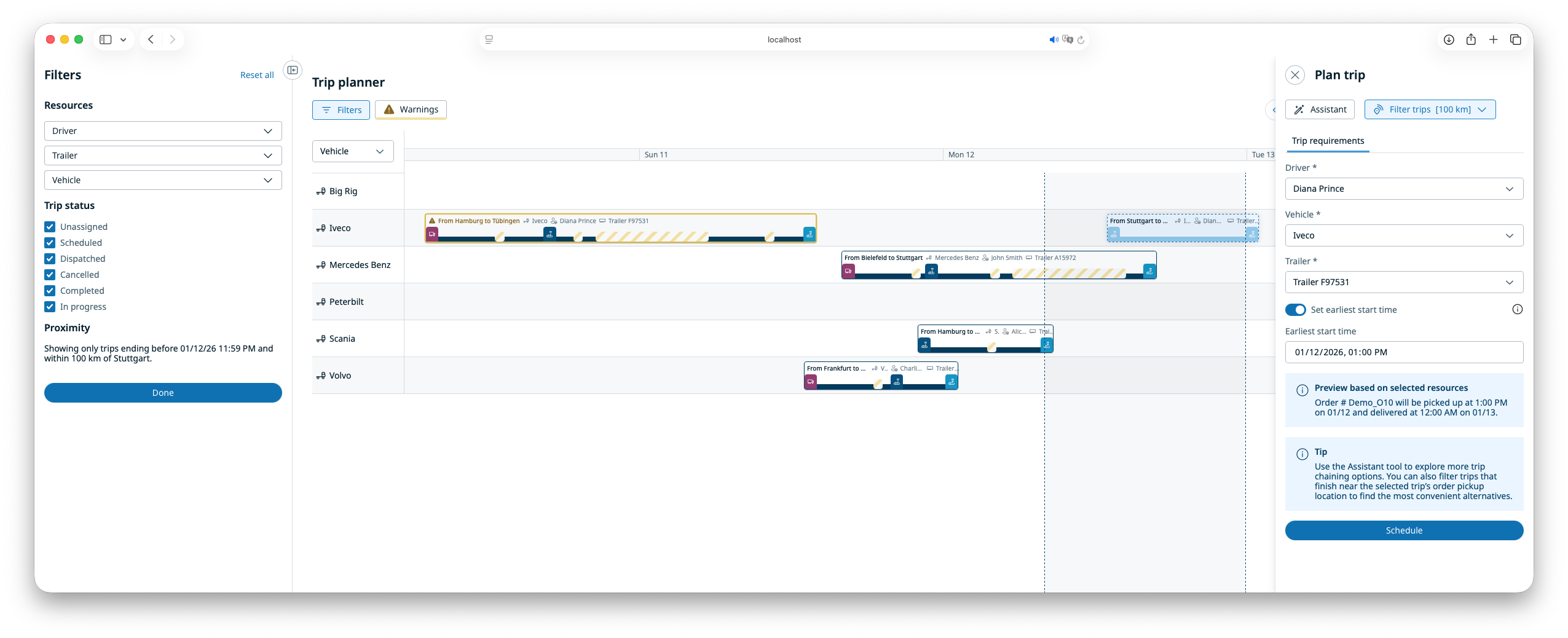
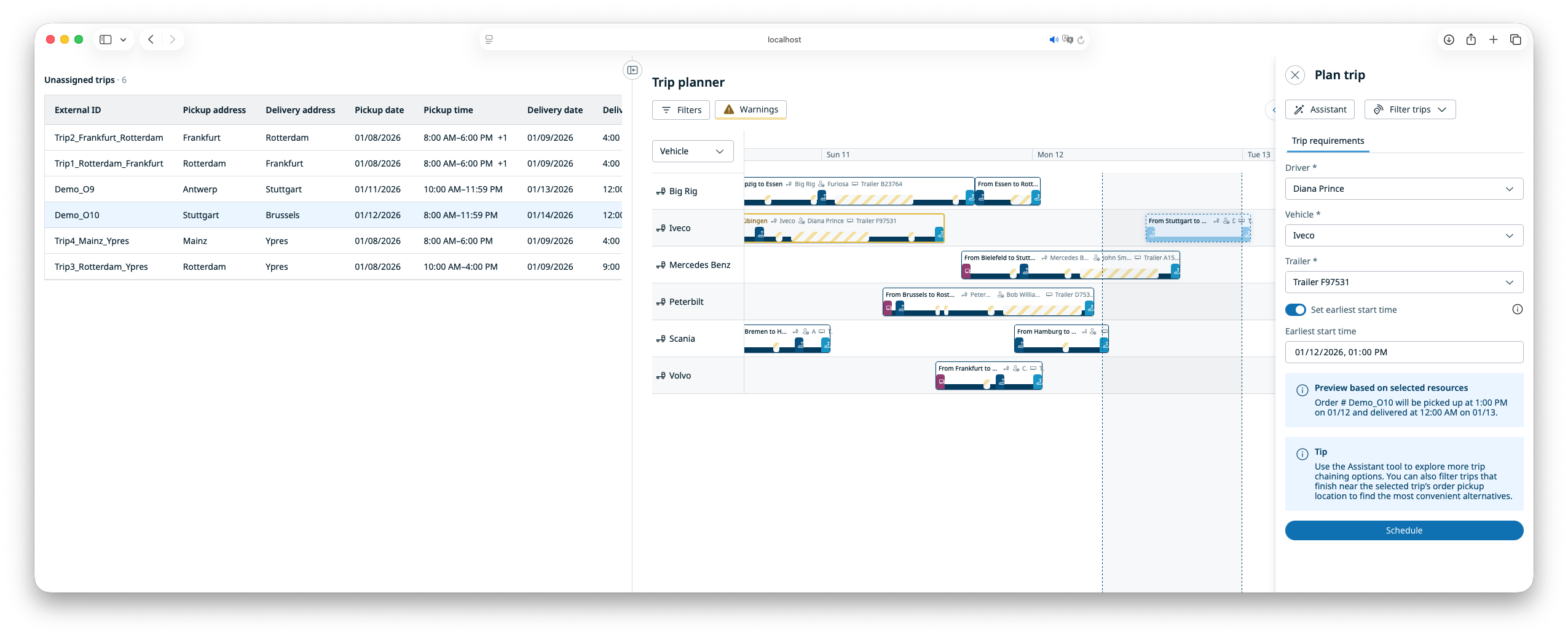
Working on this prototype was a lot of fun, with quick iterations on ideas. Mocking the API let us move fast without waiting on anyone.
It was also my first opportunity to use container queries.
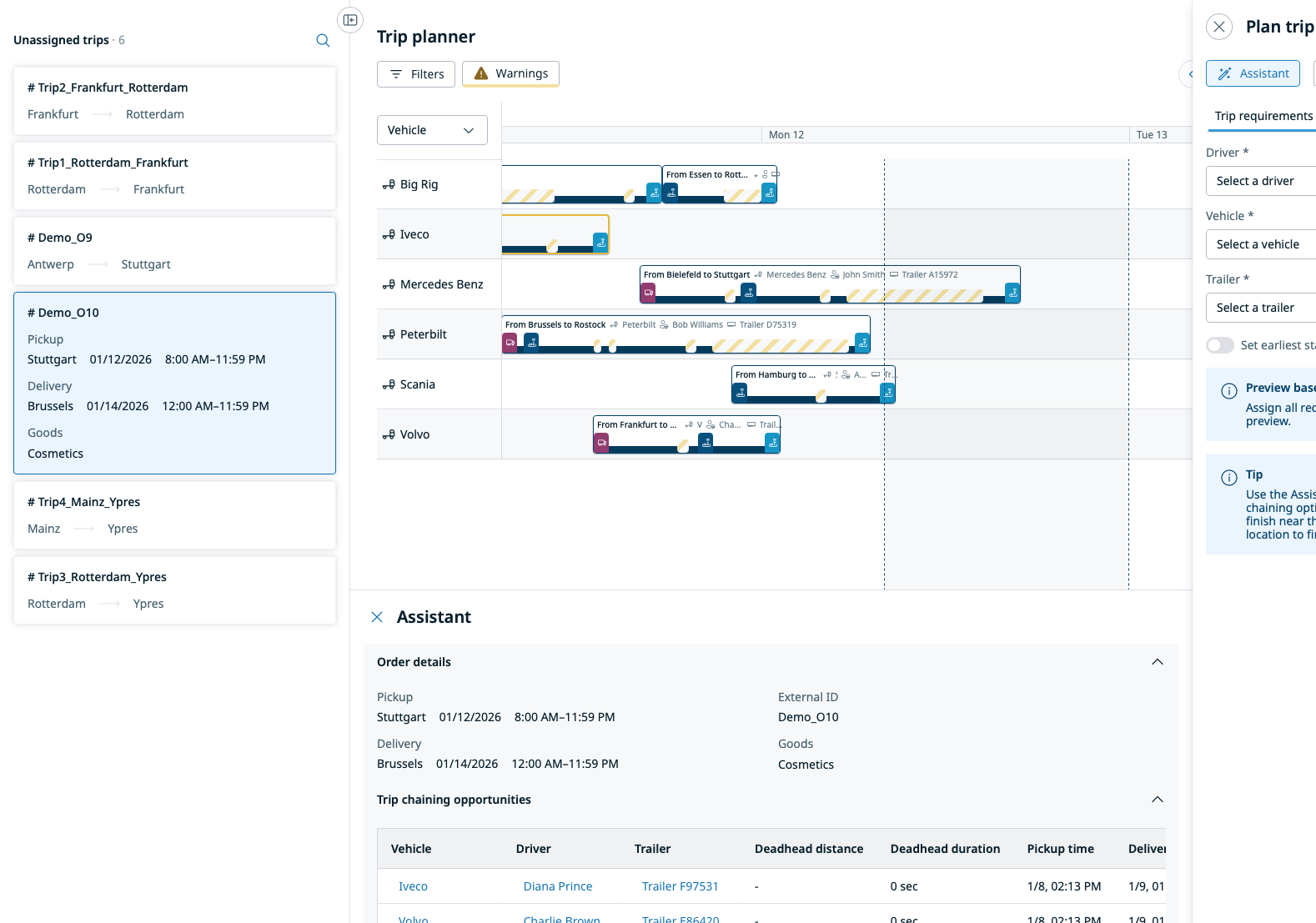
<div style={{ containerType: 'inline-size' }}>
…
</div>
.orderDetails {
  grid-template-columns: 1fr;
  grid-template-rows: repeat(2, auto);
}
@container (width >= 400px) {
  .orderDetails {
    grid-template-columns: repeat(2, 1fr);
    grid-template-rows: 1fr;
  }
}
Conclusion
This was my second job in a row focused entirely on frontend development. Some of the things that were new, at least to me:
- the container queries mentioned above
- logical properties, such as
margin-inline-startinstead ofmargin-left - the CSS resize property, handy for documenting components
- ResizeObserver, which runs code when an element is resized, though I still find it awkward to use
- repeating linear gradients for striped backgrounds
- extensive use of the HTML Drag and Drop API
- the browser’s built-in Internationalization API instead of an external library to format dates, times, distances, ISO durations, speeds and temperatures
- a monorepo with 2 apps, 8 modules and many libraries, held together by Nx and strict module boundaries
- pnpm instead of npm
Toward the end, I started experimenting with AI through Claude Code and Copilot. I found these tools useful for:
- explaining an unfamiliar codebase
- generating unit tests
- simplifying or refactoring complex code, although refactoring larger parts of an app did not work for me yet
- making sense of error messages and stack traces
- writing code in a domain I have little experience in
Overall, AI tools still felt early and experimental to me. I am curious to see how they evolve, and what remains once the hype settles.